Data Security In Salesforce: Best Practices
The article was updated on January 20, 2026
Salesforce data security has never been more pivotal. With AI and automation that are now woven into everyday workflows, the terrain of security in Salesforce is also evolving fast.
New capabilities bring fresh opportunities – and fresh avenues for risk – especially around AI, access governance, integrations, and user permissions. According to the research, 60 per cent of IT leaders aren’t fully comfortable with how customer data is handled by AI tools. About the same portion of respondents (57 per cent) expresses doubts about the accuracy and controls of those systems.
This all well underscores how crucial solid safeguards are now.
At the same time, some Salesforce security vulnerabilities have recently been identified in core components and integrations. Several of them – with serious implications for unintended access and data exposure.
This – again – places Salesforce security and access control at the top of your priorities, especially where overly permissive access rights, sprawling integrations, and audit readiness are concerned.
This Salesforce security implementation guide outlines Salesforce security best practices to help you reduce exposure and stay in control of your setup as AI-driven processes scale.
Cybersecurity Сhallenges You May Face
Before you start fighting, it helps to better understand the nature of what you’re dealing with. People and systems can fool us in many different ways, and we’ll discuss the most common and dangerous ones.
First, let’s begin with the most common – classic – Salesforce security threats that act outside the code – through people, their habits, and physical access points. We’ve also paired the “classics” with the Salesforce security gaps rooted in SF process-driven risk.
So, these are the threats that exploit human behavior and everyday routines around their environment.
Phishing & Malware
Malware is a general term to define any dangerous software that can damage or destroy your device system, data, or network.
And phishing is basically a model of stealing or damaging your data by email. The messages may look pretty harmless and not raise suspicion, but they either trick you into revealing information or attack your device with malware.
Some attackers call people to steal sensitive data like passwords or PIN codes or send messages directly to their phones, which is also a type of phishing – and one of the widespread Salesforce security threats.
Tailgating
Also known as piggybacking, tailgating is physically chasing after a person to get into a place the attacker is not allowed to. For example, they can hold the door when some of your personnel are entering the office, and in such a way sneak in.
But how does it affect your cybersecurity? With tailgating, attackers may access protected data or infect your company’s computers with viruses, creating risks that underscore the importance of Salesforce data protection.
Exploiting Public Information
The information you post on your social media might be pretty enough for hackers to hack you. If they know your employees’ phone numbers or emails, they can simply guess their passwords and access all corporate data.
Some attackers may manipulate people to reveal needed company information, threatening to spread the sensitive personal data they found with the help of social media.
Dumpster Diving
Sure, you’re imagining a bum who is exploring a dump. But we’ll change this picture a little bit: in cybersecurity, a dumpster diver is a hacker who gets valuable, sensitive information from your system trash, jeopardizing your data security in Salesforce. It can be your passwords, payment details, pictures with important data – whatever. So while your trash bin is full, you’re in danger.
Physical dumpster diving is actually also pretty common. Some attackers may search for corporate data, diving into the heaps of papers you left outside your office, or even find some passwords from the diary your employee threw away a week ago.
Next, let’s quickly touch on some Salesforce security risks tied to internal operations and process layers.
We’ll explore each point in more detail later, but for now – here’s a brief rundown:
- Over-Privileged Users. Accounts that have too many permissions create high-risk points in all SF environments. Our experience shows: even routine actions from over-permitted users can unintentionally expose critical data and much amplify Salesforce security risks.
- Shared / Generic Accounts. Do multiple people in your company rely on the same credentials? It needs urgent fixing, as accountability in this case fades fast. Tracing the source of errors or breaches in such situations becomes difficult, Salesforce security monitoring loses depth and trust.
- Inactive & Orphaned Accounts. Former employees, contractors, or temporary users often retain active credentials long after you said goodbye – alas, it’s typical. Mind that threat actors love these forgotten doors and enter SF orgs unnoticed.
- Uncontrolled Integrations & APIs. 3rd-party apps and integrations often run with wide privileges. Expired tokens or loose config can sometimes open paths to sensitive data in your setups, too. And make potential gaps in Salesforce API security.
- Lack of Regular Salesforce Security Monitoring. When settings and policies are untouched for long periods, SF security gaps appear and grow. What’s more, hardly anybody sees the problem. With time, minor misconfigurations accumulate. And – your SF setup defenses weaken.
- AI Misconfigurations & Automation Risks. We’ve probably all noticed that SF AI tools accelerate workflows much. Yet, a poor config may expose restricted info or bypass approval paths. When permissions are loose, AI models can reach more records than necessary and create hidden exposure (adding to overall Salesforce security risks).
- Data Leakage via AI Insights. Also, keep in view that insights generated by AI (for example, from your client personal data) may disclose confidential info to users who don’t have proper permissions. So, Salesforce AI security is no less important – we mention it at the very beginning.
Read Also: Common Salesforce Security Gaps Found During Audits
Even small oversights in these areas can ripple in your org and quickly turn minor slips into serious vulnerabilities. Jumping ahead for a moment, we can recommend that you keep a close eye on Salesforce security monitoring and catch hidden cracks as early as possible.
If your SF security looks fine but you’re not 100% sure, that’s already a risk. Partner with Synebo – our Salesforce consultants build defenses that hold perfectly under whatever pressure.
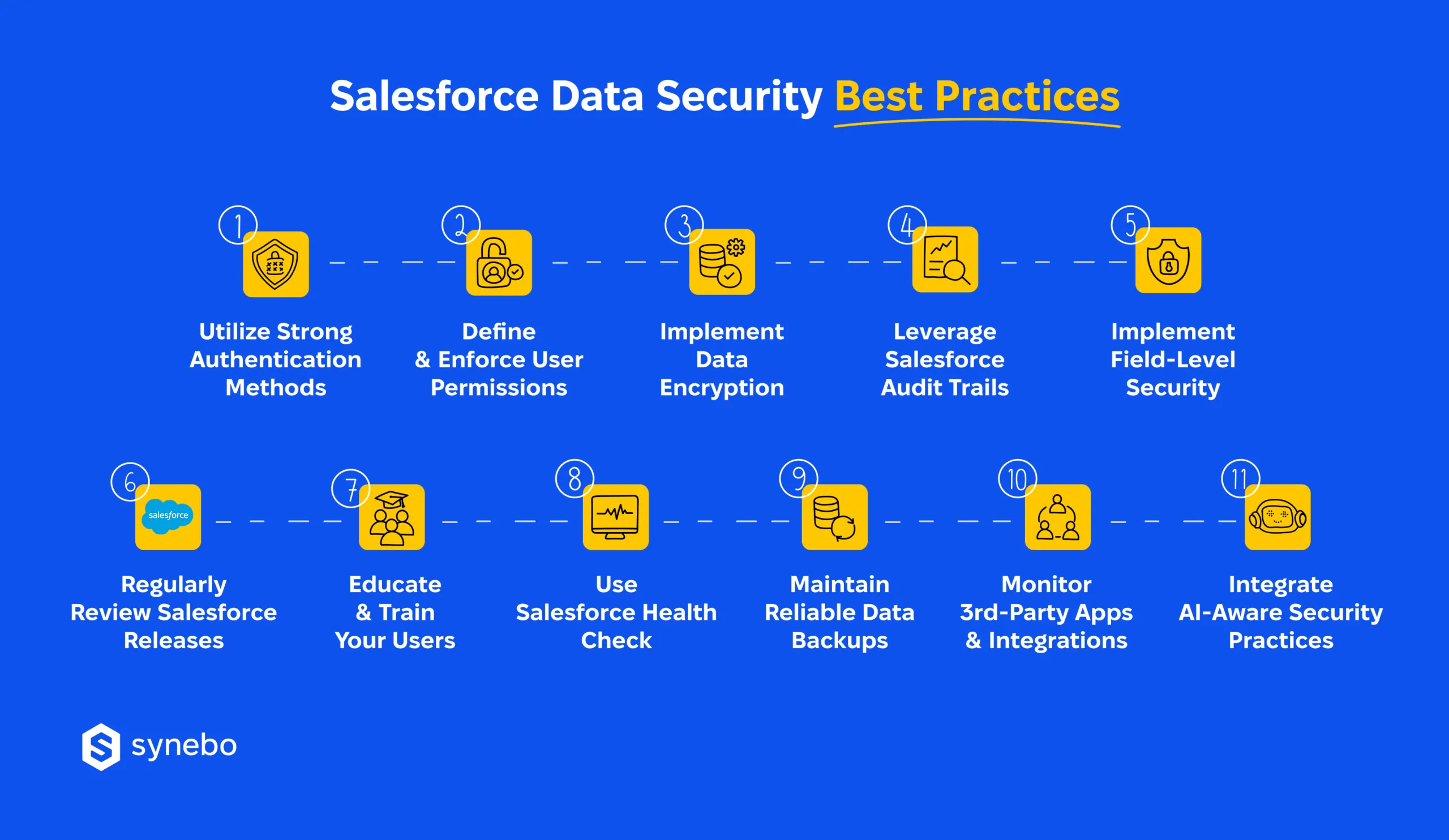
11 Salesforce Data Security Best Practices
“There are two types of organizations – those that have experienced a data breach and those that will,” shares Matt Meyers, CTA, and Founder/CEO of EzProtect, a Salesforce anti-virus scanning solution.
CTOs often lack a comprehensive understanding of Salesforce security risks, while IT project teams, overwhelmed by backlogs, fail to prioritize these crucial concerns. This disconnect is exacerbated by the fact that 48% of developers report insufficient time to address security issues adequately, highlighting the urgent need to make Salesforce data security knowledge more accessible to the C-suite.
Bridging this gap between CTOs and development teams is critical for organizations to fully grasp and mitigate the risks associated with Salesforce security, ensuring improved protection of sensitive client data and maintaining customer trust.
Below, we share 11 Salesforce security best practices we’ve tested inside our own SF orgs and with clients. Each one has proven its ability to minimize risk and protect data.
1. Utilize Strong Authentication Methods
One of the very first layers of security is authentication. It is at the front line of Salesforce data protection and directly influences how well your org withstands Salesforce security threats.
“Enabling MFA can block up to 99.9% of account compromise attacks,” as Microsoft representatives used to say.
This principle stands firm and is still highly relevant today.
Indeed, weak or outdated login controls often create invisible entry points that later turn into visible Salesforce security gaps. Strong authentication closes those doors early in advance – before attackers get close to sensitive data. What’s more, today we always recommend that AI agents should also authenticate via MFA and SSO (see below explanations what they are) to prevent automated unauthorized access.
To reinforce authentication as part of a broader SF security implementation guide, Salesforce teams rely on, focus on these practices:
- Enable Multi-Factor Authentication (MFA). Require your users to confirm their identity in many steps (for example, a password and a one-time code) and reduce the likelihood of account takeover (a “popular” cause of the Salesforce security breach incidents).
- Pair MFA with Single Sign-On. SSO (i.e. Single Sign-On) allows users to ассеss many аррs or services using a single sign-in info. So, centralize auth – this supports Salesforce integration security.
- Apply roІe-based ассеss controls (RBAC). In other words, give access according to job roles only. This limits exposure and – so – reduces Salesforce security vulnerabilities.
- Reinforce least-privilege access. Restrict permissions to what each role actually requires to perform their job. This strengthens overall security in Salesforce.
Pro tip: Treat changes in authentication as part of your ongoing Salesforce security updates. When any roles, integrations, or access patterns in your Depts shift, revisit MFA, SSO, and RBAC to prevent new risks.
2. Define and Enforce User Permissions
Granular user permissions are a huge assistance when it comes to preventing unauthorized access in SF and form a practical layer in a broader Salesforce security overview. When permissions are set correctly, users only have access to the data and tools necessary for their specific roles, reducing potential Salesforce security risks. Overly broad permissions, on the other hand, can expose sensitive data.
For example, a marketing team member with admin-level access could unintentionally alter financial data – this risk is mitigated by aligning permissions with role-based access controls (RBAC).
The same logic applies to automation: AI workflows and bots must map to clearly defined roles, or they may pull in far more data than intended.
To keep permissions under control, follow our recommendations:
- Audit permissions regularly. Review who has access to what and remove outdated or excessive rights (using built-in Salesforce security tools where it’s possible).
- Align access with job roles. Ensure permissions reflect real responsibilities, especially after role or team changes.
- Apply the principle of least privilege. Grant only the minimum access required to do the job effectively.
- Monitor for anomalies. Use access logs to detect unusual behavior or privilege misuse.
Pro tip: Regularly review access logs to spot anomalies. Reassess roles and responsibilities after promotions, role changes, or team restructuring. Use Salesforce’s security tools for managing and visualizing user permissions effectively.
3. Use Data Encryption
Encrypting sensitive data is vital for safeguarding information at rest (stored data) and in transit (data being transferred). Without encryption, your org is exposed to Salesforce security risks such as unauthorized access, theft, or exposure, especially in cases like data breaches or intercepted communications.
Encryption ensures that, even if data is accessed unlawfully, it’s rendered unreadable and unusable without proper decryption keys, protecting the integrity and confidentiality of your information.
For strong encryption, our Salesforce security specialists recommend these approaches:
- Field-level security. Use field-level encryption for personal and/or financial info – to enhance security in Salesforce at a granular level.
- Object-level security. Secure large datasets, attachments with object- or file-level encryption, too.
- Encryption method selection. Apply sуmmetric/asуmmetric encryption in accordance with your performance and security goals.
- Access сontrol reinforcement. Complement encryption with field- and object-level controls – restrict who can view or edit data.
Pro tip: Prioritize encrypting the most critical data first (it’s personally identifiable information and/or financial records). Do it, and you can be sure that even if other layers fail, your high-risk data are still secure. If it sounds difficult, consult Salesforce security specialists or review official Salesforce security documentation.
4. Leverage Audit Trails
Before further explanations, let’s clarify what is an Audit Trail in Salesforce? In fact, it’s a record of all changes. It logs updates to settings, permissions, or configs. It shows who made each change and when. You can use it to monitor, review, and maintain security and compliance in the org.
When you look through these logs, you can detect suspicious activity early and prevent leaks of data. Info you get from it can also help reinforce your overall data protection strategy.
Besides, today, AI-driven actions and bot activity must belong in audit logs as well (because automated processes can create anomalies at scale).
“Audit logs act as a digital security camera for your Salesforce environment, crucial for monitoring and enforcing Salesforce data protection policies,” says Yana Chekan, Head of Delivery at Synebo.
Example: As the Salesforce developer portal provides, when a user generates a larger report than usual, it can signal an attempt at unauthorized data export. In one instance, a threat was detected when audit logs showed an attacker using compromised credentials to extract as much data as possible.
So, this is how you can configure and utilize Salesforce audit trails:
- Enable Event Monitoring for real-time tracking of user activities.
- Turn on Field History Tracking to capture changes to critical data fields.
- Utilize Salesforce data encryption to protect sensitive information.
- Regularly audit and adjust SF user permissions for appropriate access control.
- Monitor audit logs frequently to ensure a swift response to security incidents.
Pro tip: Use Salesforce audit trails to identify unusual patterns with time (like repeated large data exports or sudden role changes). They can reveal hidden risks before they turn into breaches.
5. Implement Field-Level Security
Setting field-level security is crucial for controlling access to sensitive Salesforce data, ensuring users only see what’s necessary for their roles. Let us repeat here again: it enforces Salesforce data security best practices by restricting visibility and edit rights to confidential information, improving Salesforce user permissions management, and enhancing overall Salesforce data protection.
Properly configuring these settings helps meet compliance requirements and minimizes risks of data exposure.
Here is the field-level Salesforce security implementation procedure:
- Identify sensitive fields. Pinpoint fields containing confidential data.
- Configure field-level security settings. Use profiles and permission sets to restrict visibility and editing capabilities for specific user groups.
- Regularly review and update settings. Ensure field-level security aligns with current business needs and compliance requirements.
Pro tip: Treat field-level data security in Salesforce as an ongoing process. We suggest that you regularly audit and adjust controls whenever roles, processes, or regulations change. This way, you’ll keep your sensitive data protected.
Read Also: Salesforce Security Health Check: What to Review Every 6-12 Months
6. Regularly Review Salesforce Releases
Keep Salesforce updated to avoid vulnerabilities and ensure the latest Salesforce security best practices.
“Unpatched vulnerabilities are one of the leading causes of data breaches,” state specialists in the Ponemon Institute.
Example: In 2019, BayCorp suffered a breach due to a misconfigured permission set, resulting in a security incident that could have been avoided with timely updates.
To keep your SF under good control, apply the following update best practices:
- Monitor Salesforce release notes and updates.
- Test patches in a sandbox environment before deploying.
- Automate update schedules to ensure timely implementation.
- Regularly audit your system for misconfigurations, either in-house or with Salesforce security audit services.
Pro tip: Don’t wait for release notes to land. Subscribe to SF release alerts and integrate them into your internal change management workflow. If you perform a Salesforce security audit proactively, run pre-deployment tests, and track patch implementation, you turn routine updates into your strong advantage.
7. Educate and Train Your Users
Educate and train your users to strengthen Salesforce security awareness, reducing risks of user-driven incidents. Regular training helps users understand Salesforce security best practices and proper handling of sensitive data.
When Synebo’s Salesforce security consultants deliver security training, we focus on these proven approaches to building security-aware teams:
- Use interactive online training and quizzes to engage users and reinforce learning.
- Conduct regular phishing simulations to test awareness and reduce susceptibility to attacks.
- Provide security updates and best-practice newsletters to keep security top of mind.
- Host hands-on workshops for practical, Salesforce-specific training and scenario-based learning.
Pro tip: One-off sessions quickly lose their impact. So, treat Salesforce security training like a live system. Such an approach keeps awareness of your employees relevant, timely, and more effective than annual refreshers alone.
8. Use Salesforce Health Check
Use Salesforce health сheck to assess and enhance your organization’s security settings. It helps identify Salesforce security vulnerabilities and recommend fixes – fast.
Read Also: How to Run a Salesforce Health Check
Тhe health check process follows a few key steps that accord to Salesforce security best practices:
- Run security health checks in Salesforce regularly to monitor security.
- Review the score and identify risks.
- Implement suggested changes based on priority.
Pro tір: А higher score on the сheck implies better security alignment. So, aim for a “Very High” result. Review each risk you found and аррlу changes (like user permissions, data encryption, etc). Also, review how AI features and automated integrations influence your security results. After that, cІose the gaps where these tools widen access (or bring exposure).
9. Backup Your Data
Regular data backups are essential to protect against data loss or corruption due to system failures, human errors, or malicious attacks. In SF, both native and third-party solutions are available to automate backups and ensure business continuity. Using these Salesforce security tools helps you have consistent protection of your critical business data.
Native options are the Data Export Service, which allows weekly or monthly backups, and SF Backup and Restore, a more advanced solution for automated backups and data recovery.
3rd-party providers (for instance, OwnBackup or Spanning) add extra сараbilities: automated daily backups, granuІar recovery, tools for data comparison. They help you maintain Salesforce security compliance in your org.
Best practices for data backups we recommend:
- Schedule backups daily or weekly.
- Test backup restoration regularly to ensure the process works smoothly.
- Use encrypted storage for backups to protect sensitive information.
Pro tip: From our professional experience, the Salesforce tech team highly recommends aligning backup frequency with your business’s operational needs and the criticality of data. Another good tip is to ensure compliance with relevant data protection regulations, such as GDPR, by keeping backups for the appropriate retention periods.
10. Monitor Third-Party Apps and Integrations
Third-party applications and integrations can introduce risks to your SF environment if not properly vetted and monitored. These Salesforce integration security risks include data leaks, unauthorized access, and system vulnerabilities.
As a part of Synebo Salesforce integration services, we always ensure that there are strong security measures in place, supported by continuous Salesforce security monitoring.
“Third-party apps can be the weakest link in your security chain if left unaudited and unmonitored,” say cybersecurity experts at Synebo.
For vetting third-party integrations, rooted in Salesforce API security best practices, perform the following:
- Evaluate the security certifications and reputation of the third-party provider, especially for API-heavy tools (tied to Salesforce API security).
- Ensure the app complies with Salesforce’s security standards and your organization’s data protection policies.
- Monitor app activity regularly to detect unusual behavior.
- Limit the app’s access to only necessary data through permissions and role-based access controls.
Pro tip: Conduct security reviews and audits of all integrations at regular intervals to catch any emerging risks.
11. Integrate AI-Aware Security Practices
AI adds speed to operations – for sure. Yet, it can stretch permission boundaries behind the curtains. So, with this in view, to protect data security in Salesforce, we strategically recommend that you treat AI not as a background helper only, but as a governed participant.
Just include it to your protection principles: Salesforce AI security requires constant visibility. It is even more important if your org(s) is complex, where automation and integrations intersect and audit pressure stays high.
And the proven practices we advise to kеер AI-driven access controlled are:
- Track AI activity for unusual patterns in access. Plus, note if there are unexpected data usage in your objects | records.
- Set AI workflow access to follow RBAC and least-privilege policies. This step prevents too broad permissions.
- Review АІ integrations on a schedule; pay your special attention to 3rd-party or shadow АІ tools that magnify data risk.
Pro tip: Fold AI risk checks into your regular Salesforce security check cycles. This supports your audit readiness and structures security reviews.
Breaches don’t start with hacks. They start with small oversights. Let Synebo close the gaps – hire a Salesforce consultant who treats your data like mission-critical assets.
Common Mistakes to Avoid in Salesforce Security
It’s a fact from our everyday observations: many companies follow Salesforce data security best practices on paper. Yet, small execution gaps still open the door (the gate!) to risk.
It’s unlikely that upon implementation of the best practices listed above, you will have any serious vulnerabilities left.
Still, here are mistakes that may occur and be revealed during a security health check in Salesforce if companies postpone review for long:
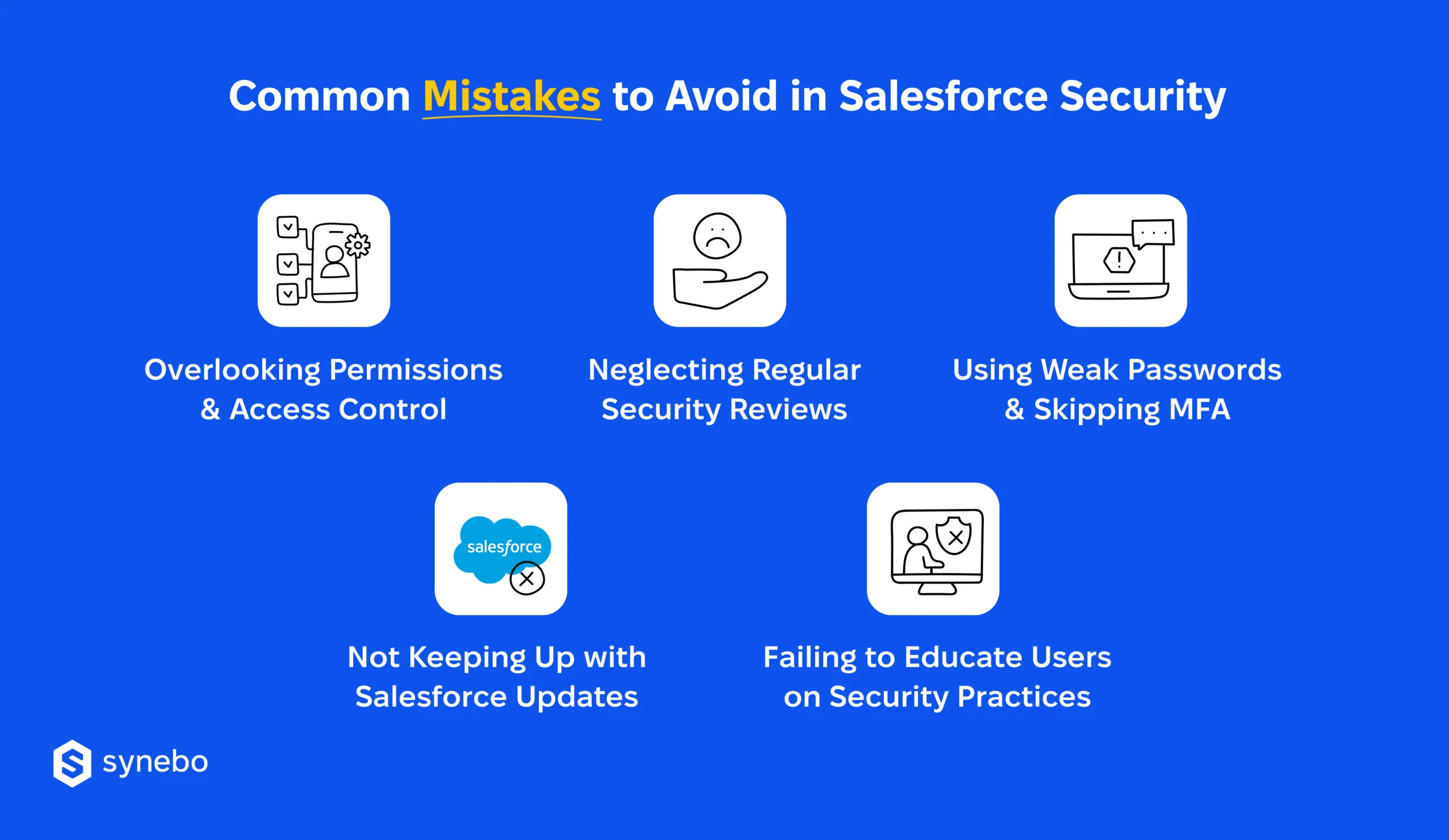
- Overlooking permissions and access control. Granting overly broad access can expose sensitive data – a common source of Salesforce security gaps. Adverse effects include unauthorized data access and data leaks.
- Neglecting regular security reviews. Skipping periodic audits can result in overlooked vulnerabilities, especially in integrations and APIs tied to Salesforce integration security. Potential effects include unpatched security gaps and compliance risks.
- Using weak passwords or not implementing MFA. Weak passwords and a lack of multi-factor authentication (MFA) leave systems open to Salesforce security breaches. This can lead to unauthorized account access and potential data theft.
- Not keeping up with Salesforce updates. Ignoring SF security patches can leave the system vulnerable, particularly when new Salesforce security updates address recently discovered issues. Missing these updates increases the risk of security exploits.
- Failing to educate users on security practices. Lack of user awareness about security policies can lead to accidental data exposure or phishing attacks – another frequent trigger for Salesforce security breaches. A well-informed team minimizes risks.
As you can see, they are mostly attributed to the lack of data security in workplace training. In that regard, there’s a need to discuss how to develop a proactive security culture in your organization.
Creating a Proactive Security Culture
Strong security in Salesforce begins with people. Your employees’ habits are important. And shared accountability matters much. When your whole company understands why controls exist and how threats appear, data security in Salesforce shifts from a mere formality. It turns into practice all your Depts stick to.
So, what is a practical path toward reducing Salesforce security risks and closing common Salesforce security gaps?
These steps create a proactive security culture in your company:
- Training & Awareness. Regularly train employees on Salesforce security features, safe data handling, and threat patterns that match their responsibilities, including risks tied to integrations and APIs that often trigger Salesforce security issues.
- Security Policies. Develop clear policies for data access, sharing, and storage, with guidelines that support Salesforce security and compliance requirements and remove ambiguity around sensitive info.
- Access Control & Monitoring. Use role-based permissions and regularly monitor user activity to detect any unusual behavior – strengthens ongoing Salesforce security monitoring and limits exposure before problems escalate.
- Security Аudits & Updates. Conduct periodic audits to find vulnerabilities and stay updated on Salesforce security best practices.
- Security-first mindset. Encourage employees to report security concerns, emphasizing Salesforce data protection as everyone’s responsibility.
Basically, once you implement security measures on technical, infrastructure, and software levels and have an established security culture in the organization, you can claim that you have achieved the highest level of data security in Salesforce.
When Salesforce Security Faces Real Scrutiny
Strong data security in Salesforce hardly ever collapses because of missing tools. Much more often, it cracks through permissive access, unstructured security reviews, data exposure through integrations. As your org(s) grow more complex, hidden Salesforce security issues reveal themselves during audits, compliance checks, or incidents – often all at once.
Sustainable Salesforce data security protection is built on disciplined access and control, plus structured reviews, and clear ownership. And at this stage, experience matters – a lot.
An expert Salesforce security engineer brings order to permissions, integrations, and AI flows. And they do it without slowing delivery. With their support, security becomes a controlled, reviewable system that scales with your org.
So, if you feel your protective stance is fragile, our Salesforce specialists can help you regain control and prepare your SF setup for growth without exposure.
Bring your org security under clear governance – schedule your consultation with Synebo.
You can configure Salesforce user permissions by setting up role hierarchies and sharing rules. This allows you to control data visibility based on a user’s role, ensuring only authorized individuals access specific records, aligning with Salesforce security best practices.
To enhance Salesforce data protection, use Salesforce data encryption via Shield Platform Encryption. This process secures sensitive data like customer details or financial information at rest while allowing functionality such as searching and reporting, safeguarding your business.
Ensure GDPR compliance by leveraging Salesforce audit trail, managing data retention policies, and using Salesforce user permissions to enforce access controls. Implement Salesforce data encryption to protect personal data and maintain detailed consent management within the platform.
Protect API integrations by using OAuth tokens, enforcing IP restrictions, and configuring Salesforce user permissions. Ensure API traffic is encrypted with SSL/TLS, further enhancing Salesforce security best practices and preventing unauthorized access to sensitive data.
You can use the Salesforce audit trail to monitor changes and access to critical data in real time. Paired with Event Monitoring, these tools align with Salesforce security best practices, ensuring visibility into all actions within the platform.