How to Select the Right Apps on Salesforce AppExchange

The article was updated on December 22, 2025.
When choosing apps on Salesforce AppExchange that will considerably boost your business, you can feel as if you’re navigating a dense market with thousands of options. Yet, the payoff is huge: you will free your team from repetitive, boring tasks, sharpen your workflows, guard sensitive data, and overall make wiser decisions faster.
Businesses leaning into the Salesforce app marketplace aren’t wandering. The absolute majority of SF customers (>90%) install at least one AppExchange app, and the ecosystem now hosts thousands of apps in core categories like Sales, Productivity, and Administration.
Regardless of your role – a decision‑maker aiming for better process efficiency, an IT lead vetting well-working tools, or a consultant who guides clients – understanding how to evaluate options is critical. From rating quality to gauging integration ease – when you make smart choices at the selection stage, you stop small problems and don’t let them multiply later.
And in this article, we will explore how to choose apps on Salesforce AppExchange and study important criteria. Plus, we’ll highlight key categories of apps on Salesforce AppExchange and review some of the top solutions in each category.
What Is Salesforce AppExchange?
It is the central marketplace where SF customers expand their platforms with the help of targeted applications. Instead of building every feature internally, you can tap into this ecosystem – a well-organized catalog – and get the AppExchange products you need.
Here is what the Salesforce AppExchange marketplace offers in practice if you want to enhance your setup:
- Extensive App Ecosystem. AppExchange has thousands of vetted apps, components, and industry solutions. They are built to extend SF capabilities in different domains. Each listing follows standards, and this reduces buyers’ uncertainty during evaluation.
- Solutions for Every Role. Here, your Commercial crew can effortlessly discover productivity boosters, marketers – access analytics tools, service leaders – adopt case-management add-ons, admins – find automation utilities. And so on.
- Pre-Built Integrations & Custom Options. Many AppExchange apps arrive with native SF connections; their flexible configuration allows adaptation to specific processes in your company – they don’t require heavy rework or long delivery cycles.
- Secure & Trusted Environment. Every product passes SF’s security review (which is strict – harsh, some can add). The review covers handling of data, access control, and compliance requirements. For many industries, especially regulated ones, it reinforces their confidence in the products.
Within the рrogressively advancing Salesforce AppExchange ecosystem, choosing apps on Salesforce AppExchange became now less about experimentation.
It’s more about informed selection. And when done right, your business gains dependable solutions that boost your growth without draining time or resources, and you see results faster.
How to Select Apps on Salesforce AppExchange
We’d compare choosing the right apps from Salesforce AppExchange, not with shopping. In fact, it’s similar to due diligence – careful assessment, then selection. Because this choice impacts your SF workflows, budgets, and long-term stability, surface-level appeal rarely works here.
Meanwhile, all strong picks share clear signals. And here’s a breakdown of the most important ones.
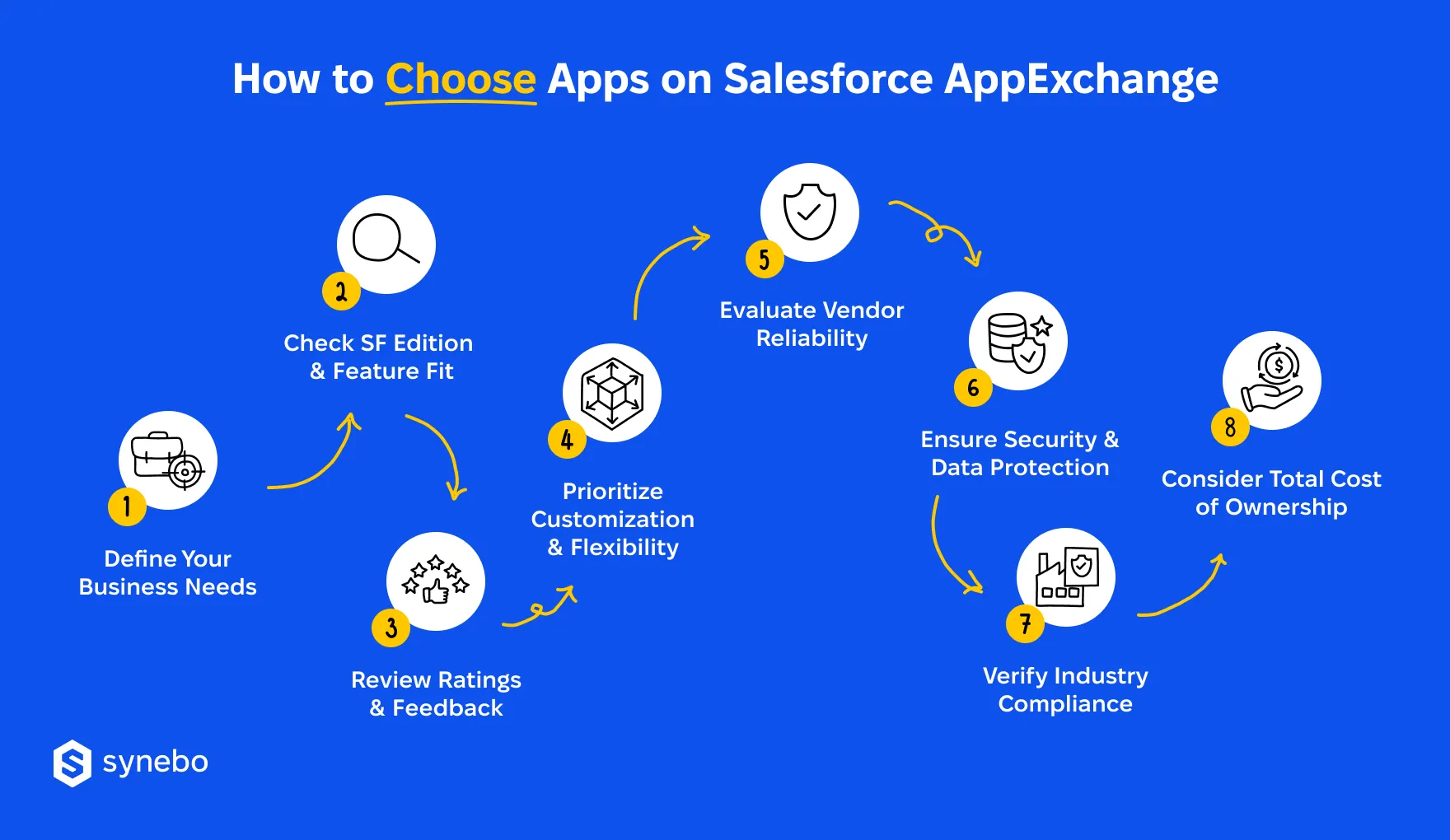
1. Understand Your Business Requirements
Before you begin browsing apps on Salesforce AppExchange, it’s crucial to identify what specific problems you’re trying to solve or which areas of your Salesforce environment need enhancement.
Ask yourself:
- Optimized processes. Do you need to streamline workflows?
- Analytics. Is there a need for better reporting and analytics?
- Improved client interaction. Are you looking to enhance customer engagement?
- Sector-focused products. Are you expanding into new verticals and require industry-specific solutions?
Clearly defining your objectives will help narrow down the search to the AppExchange applications that meet those goals.
2. Compatibility with Salesforce Editions and Features
Not all apps are compatible with every Salesforce edition. Before you download, ensure the app supports your specific Salesforce environment (e.g., Enterprise, Professional, or Essentials).
Also, consider the following:
- Integration with existing systems. Ensure the app integrates seamlessly with your current Salesforce setup and any third-party applications you use.
- Data sync and flow. Confirm the AppExchange application doesn’t disrupt your existing data architecture and allows for smooth data sharing between systems.
Verifying these factors ensures the app you are picking works well in your SF ecosystem – with no disruptions or extra overhead.
3. User Reviews and Ratings
The AppExchange Salesforce apps market provides detailed user reviews and ratings. These reviews are essential for understanding how well the product performs in real-world use cases.
Look for:
- Overall ratings. Apps with consistently high ratings (4+ stars) tend to perform better and offer more stability.
- Detailed feedback. Pay attention to reviews that discuss specific challenges, especially those related to performance, customer support, and ease of use.
- Number of downloads. The Salesforce AppExchange apps with many downloads often indicate trust and popularity among SF users.
Sometimes, highly capable but newer apps haven’t yet amassed enough reviews, yet we still recommend keeping an eye on the ratings.
4. Customization and Flexibility
The best AppExchange apps allow customization to suit your business processes.
Review the app’s ability to:
- Personalize workflows based on your specific requirements.
- Adjust functionalities to cater to industry-specific needs.
- Scale with your business as it grows, ensuring you won’t outgrow the app’s capabilities too quickly.
Such abilities ensure the app you’ve picked fits naturally into your SF environment today. And will continue to support your requirements as you expand.
5. Vendor Maturity and Support Commitment
A reliable vendor shows consistency long before their apps on Salesforce AppExchange start getting any installs.
To make sure you can trust the vendor:
- Review release history plus update frequency – to understand their long-term focus
- Study ratings from their customers, written feedback, and response patterns
- Assess quality of the docs and support channels that they offered
Stable providers reduce rework and protect their internal effort. So, they keep operations steady during all phases – app development, launch, and maintenance.
6. Security Standards and Data Protection Readiness
Every Salesforce AppExchange app touches data (just like any app ever built). So, trust here is a must.
Keep security top of mind:
- Confirm SF security review status and scope
- Examine permission models, access controls, and data handling practices
- Check how updates address newly identified risks
System and reputation – this is what the Salesforce marketplace apps protect when they meet SF security standards.
7. Industry Compliance Fit
Usually, regulated sectors demand more than general safeguards.
So, when evaluating products on the Salesforce AppExchange:
- Check adherence to such standards as GDPR, НІРАА, or SOC 2
- Look for industry-tailored certs or references
- Review how audits + reporting work inside Salesforce
These efforts prevent costly adjustments you may face after and keep the governance you require – intact.
8. Total Cost of Ownership Reality Check
We all admit that the license price rarely tells the full story.
So, choosing app(s) on Salesforce AppExchange:
- Factor subscription fees, add-ons, usage tiers
- Include setup effort, admin time, future scaling costs
- Compare the app long-term value vs development alternative
Such cost inventory/visibility helps you make smarter forecasts and secure steadier returns for your business.
If you need expert guidance or support, Synebo, a trusted Salesforce integration company, can help pick and integrate SF applications into your CRM smoothly. Contact us.
Steps to Select the Right App on Salesforce AppExchange
Here’s a step-by-step approach to ensure you pick the best app for your organization.
1. Browse and Filter on AppExchange
The Salesforce AppExchange marketplace provides powerful filtering tools.
Narrow down your options by filtering based on:
- Industry. Focus on apps designed for your specific sector.
- Price. Some apps are free, while others are subscription-based or one-time purchases. Assess your budget before choosing.
- Rating. Focus on highly rated apps with detailed reviews.
- Salesforce Editions. Ensure compatibility with your version of Salesforce.
2. Test with Free Trials and Demos
Most apps on Salesforce AppExchange offer free trials or demos.
Take full advantage of these:
- Assess functionality. Make sure the app can handle your key tasks and solve the challenges you’ve identified.
- Involve key stakeholders. Get feedback from team members who will be using the app regularly to ensure it meets their needs.
3. Check for Salesforce Integration Capabilities
It’s critical that any app you select integrates smoothly with your existing Salesforce setup and other third-party tools you use.
Check for:
- Pre-built integrations. Some AppExchange apps offer direct integration with popular tools like Mailchimp, Slack, or HubSpot.
- APIs for customization. For more complex needs, APIs allow your developers to customize and integrate the app with unique systems or processes.
Seek support for integrating an AppExchange app? Contact Synebo, your experienced Salesforce integration partner. We’ll help you with selection and smooth implementation.
Top Categories of Apps on Salesforce AppExchange
The marketplace works as a structured ecosystem. If/when you know its main categories, this shortens your evaluation time and helps you focus on tools with clear business value.
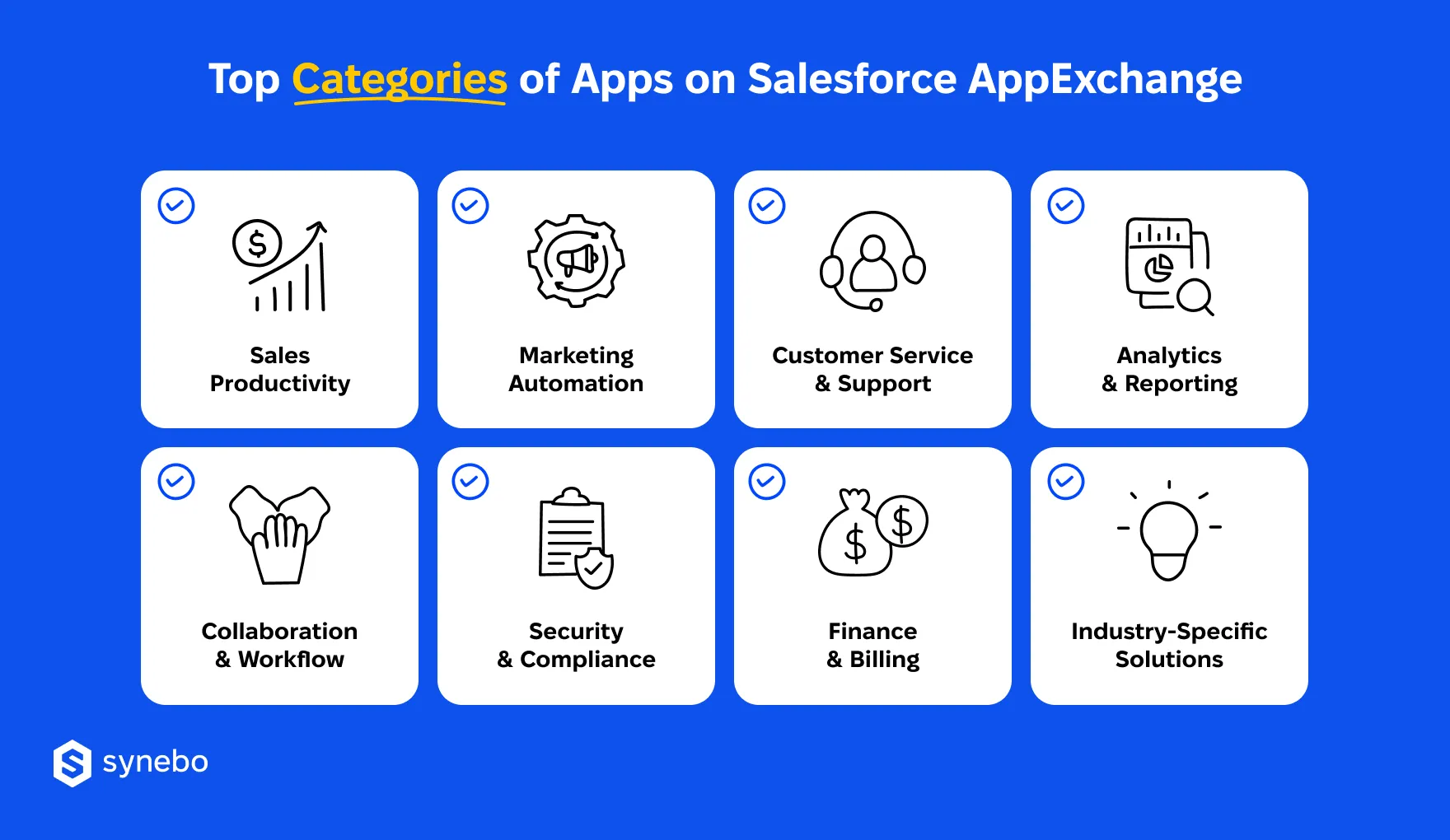
These categories of apps on Salesforce AppExchange cover the most sought-after operational needs:
- Sales Productivity Apps. Solutions that optimize lead processing, increase visibility into opportunities, speed up closure of deals; they often reduce manual steps in pipelines.
- Marketing Automation Apps. Platforms that coordinate marketing campaigns, automate emailing, target customer groups – and link marketing to revenue metrics.
- Customer Service & Support Apps. The AppExchange products for routing cases, chats, and knowledge management that support controlled response cycles.
- Analytics & Business Insights Apps. Dashboards and insight tools that structure SF data into forecasts, trends, give views for executive decisions.
- Collaboration & Workflow Apps. Products that facilitate approvals, organize tasks between teams, support collaborative workflows, preserve centralized context inside SF.
- Security & Compliance Apps. Extensions that fortifу data safety, tracking, and preparedness for audits – in orgs with serious governance criteria.
- Finance & Billing Apps. Tools for managing invoices, subscriptions, payments, and so on that enable predictable revenue operations.
- Solutions for Industries. AppExchange applications for FinTech, healthcare, retail, and other sectors that address those niche operational and regulatory requirements.
Read Also: 10 Best Salesforce AppExchange Apps for Fintech Companies
Understanding these types of products available on AppExchange makes your picking process more intentional. Instead of browsing blindly, you compare options in the right category and get a reliable, well-integrated tool faster.
Top AppExchange Apps to Boost Your Business in 2026
In 2026, many businesses look at those apps on Salesforce AppExchange that offer a sharper focus. It’s happening for a simple reason: the right selections replace much manual effort, bring structure to process control, and deliver outcomes that are predictable at the moment and stay predictable with time.
Below is a category-driven view of top Salesforce AppExchange apps that reliably demonstrate their impact on business.
Sales Productivity Apps
- Conga Composer. Automates creation of quotes, proposals, and contracts directly from SF data. Your people in Sales can generate structured, branded documents fast and reduce human error. The app supports approval flows and compliance needs (which is good for complex deal cycles).
- Groove. One of the best Salesforce apps to manage multi-channel sales campaigns across email, calls, and meetings. It captures every activity and automatically logs it in SF. It boosts lead and opportunity management, helps sales staff prioritize prospects, and close deals quickly.
- LeanData – A powerful go‑to‑market tool that automates lead routing and helps ensure leads and opportunities land with the right reps. It improves follow‑up speed and pipeline flow, plus – surely – reduces manual data work.
Marketing Automation Apps
- Pardot. One of the best Salesforce AppExchange apps for B2B marketing specialists who rely on SF data. It supports lead scoring, nurturing, attribution, and helps marketers sync their campaigns with impact on revenue (as it keeps sales & marketing data in one environment).
- MassMailer. Allows marketers to send bulk and targeted emails from SF, track performance metrics, and automate email alerts and campaigns. Because it works inside SF records, your team sees engagement without exporting lists or using any external tools.
- Adobe Marketo Measure. A marketing attribution tool that tracks campaign influence + revenue impact. It connects with SF campaigns and enables marketers to analyze and optimize where pipeline contributions come from. The tool lets you make better budget decisions and get improved campaign performance.
Customer Service & Support Apps
- Vonage Premier. Another example of a top Salesforce app. It combines telephony + analytics + digital channels with Service Cloud. Agents can route calls, chats, and messaging inside SF, view interaction history in one place, and more.
- SMS Magic & Conversive. One of the best AppExchange apps for Salesforce – a messaging platform – that brings SMS conversations into SF for customer support staff. It supports conversational messaging using SMS/MMS and integrates with SF data to manage cases and engagements.
Analytics & Reporting Apps
- CRM Analytics (Tableau CRM). This is not a regular app on AppExchange, but an SF own product, but we can’t ignore it here. It delivers advanced insights based on data in SF with role-based dashboards. With it, you can explore trends, risks, performance – using visuals that are tied to operational data.
- FunnelSource: Forecasting & Sales Enablement. One of the top apps on Salesforce AppExchange for forecasting and analytics focused on pipeline accuracy and quota attainment. It provides good forecast views, quota dashboards, and pipeline metrics that help you understand where deals sit and where adjustments are needed.
- Rollup Helper. A reporting accelerator that lets your admins build complex roll‑up summaries and aggregations. It calculates various metrics (such as averages, counts, sums) using related records, and helps create accurate dashboards and performance reports without manual data prepping.
Apps for Better Collaboration
- Conga Orchestrate. Another Salesforce AppExchange top app that manages structured workflows connected to SF processes. It supports multi-step approvals, handoffs, and compliance-driven flows between various Depts.
- Cloud Coach. A services automation and project‑coordination platform. Different Depts can plan projects, manage resources, and track delivery stages with dashboards that help maintain alignment between them (the Dept involved) and stakeholders.
- Project Management & Onboarding App. One of the best AppExchange apps for managing projects, onboarding, cross‑department/team workflows. It gives you visibility into tasks, milestones, and timelines, plus connects work execution directly with CRM data. Its templates and automated task assignments help reduce manual coordination.
Security & Compliance Apps
- Salesforce Shield. This is another exception (as it’s not an AppExchange app but SF’s native security layer). Still, it’s a logical starting point. Shield adds platform-level encryption, event monitoring, and audit trails to SF environments. It gives security and IT teams provable control over access to data, user activity, and compliance-critical actions.
- Veeam Backup for Salesforce. A good backup and recovery AppExchange application that lets you decide where your SF data lives (on-premises, in AWS, Azure, other environments). It simplifies data restoration after errors or unexpected changes, and supports fast recovery for records, files, and metadata.
- Cloud Compliance. A Salesforce AppExchange app that focuses on data security and compliance requirements (GDPR | ССРА | НІРАА). It manages retention of data, sandbox masking, automates privacy requests. The solution lets in-house specialists enable security policies in SF and considerably relieves manual effort.
Fin Operations & Рауment Apps
- Salesforce Payment Processing (Kulturra). This app on Salesforce AppExchange deserves your attention, too. It supports PCI-compliant credit card and АСН payments in different industries, plus subscription/recurring billing, invoicing, and POS functionality. It lets you accept payments anywhere in SF, use payment links, and integrate with Stripe, and 120+ other gateways.
- Chargent Payment Processing. It is a versatile AppExchange app that lets you handle credit card and АСН payments in SF, supports invoicing, ongoing billing, and customizable payment pages. It well integrates with major gateways.
Industry-Specific Solutions
Manufacturing & Product
- Propel. A product management app on Salesforce AppExchange that unifies PLM, QMS, and PIM in one platform. It helps coordinate development and enforce quality standards, centralizes product data. This improves collaboration between engineering, manufacturing, and client support Depts.
On-Site Service & Equipment-Based Industries
- ServiceMax. A field service execution platform (for heavy equipment, industrial services, utilities) you may pay heed to if your business operates in these domains. The application manages orders, technician scheduling, contract entitlements, mobile field operations, and more.
Medical & Biotech Industries
- Lockbox LIMS. А Salesforce AppExchange app that centralizes sample tracking, test results, quality control workflows. It helps optimize lab operations and standardize procedures, and keeps records traceable. Overall, it contributes to improving operational confidence in testing and compliance processes.
Salesforce Apps: Integration Made Simple by Synebo
The Salesforce app marketplace offers thousands of solutions. So, there’s no shortage of options to explore. Here, we’ve shown how to cut down the time spent on trial-and-error experiments. And after you pick the right app(s) on Salesforce AppExchange, it (they) can truly help boost your business and give your people confidence and control of their work.
Meanwhile, in practice, when working with clients, we see that what may become a stumbling block is the integration of selected apps with SF. If you encounter this issue or generally struggle to identify which application can best optimize your performance, count on Synebo as your experienced AppExchange Salesforce partner.
Our specialists will surface applications and then help untangle integration complexities. Relying on the Salesforce app integration services from Synebo, you can quickly and painlessly connect new solutions to your existing CRM environment and extract maximum value from each investment.
Contact our Salesforce integration consultants to see how the right combination of apps, integrated effectively, can accelerate your processes, protect data, and drive good results – without overcomplicating your SF ecosystem.
First, check if the app you’ve picked is compatible with your SF edition (Essentials / Professional / Enterprise). Plus, if it says it’s native SF integration. Verify support for up-to-the-moment data sync and explore pre-built connectors or APIs for 3rd-party tools. To avoid disruptions in your live system, test the app in the sandbox and consult your IT crew or a Salesforce integration consultant.
Many AppExchange apps offer рersonalization of workflows, system settings, data fields. Lightning-based apps often include visual builders for interfaces, workflows, reports. If your needs are complex, open APIs allow deeper customizations. You can tweak notifications, user roles, and interface layouts to reflect your branding. Be sure to study the docs to determine if adjustments need coding or you can do it through point-and-click setup.
Yes, you can find many free apps on Salesforce AppExchange. For example, in categories like project management and email marketing. Such applications cover automation of basic workflows, tracking tasks, management of data. Note that free solutions may have limited features compared to premium versions. They may also ask for a charge for add-ons or advanced support. Overall, you may start with free apps (to try functionality), then consider investing in premium versions.
To see if development is active, сheck the app’s update history and frequency. Plus, check compatibility with SF. Review release notes for new features and/or bug fixes. Make sure vendor reputation is OK – look through customer feedback and ratings. Vendors with robust support, good communication, and prompt resolution of issues usually prove long-term reliability. These actions as a whole help avoid problems from outdated software.
While free apps can be highly valuable for smaller teams or companies with specific needs, paid apps often provide more comprehensive features, better support, and enhanced security. Paid apps typically offer advanced functionality such as detailed reporting, automation capabilities, and integrations with other third-party tools. They also usually come with a dedicated support team to assist with installation, troubleshooting, and updates, which can be critical as your business scales.