How to Get Listed on Salesforce AppExchange

The article was updated on December 17, 2025.
Getting listed on Salesforce AppExchange – in front of thousands of customers – sounds exciting. But with more than 9k apps on the AppExchange and thousands of ISV partners, the path to visibility is intensely competitive now. Plus, it’s increasingly guided by high security expectations and quality standards. And those standards are constantly rising. Every year.
Security reviews aren’t optional on the marketplace. They serve as gatekeepers, and they are strict. They ensure trust for buyers. At the same time, they represent a common point where releases stall. Even seasoned teams can underestimate the depth of the Salesforce AppExchange listing process and leave room for costly rework.
What’s more, SF customers historically adopt AppExchange tools at high rates, and listings are projected to continue climbing. In these circumstances, understanding how to list an app on the AppExchange is your strategic necessity.
In this article, we’ll walk through how to publish a Salesforce AppExchange app, outline Salesforce AppExchange listing requirements, and share AppExchange listing best practices to help you avoid missteps and speed delivery.
Salesforce AppExchange Listing: Why Your App Benefit From It
The Salesforce AppExchange platform is a thriving marketplace for business applications and solutions. It offers a unique opportunity for developers and companies to reach a vast audience of Salesforce users. Listing your app on AppExchange is your integration into a vibrant ecosystem where demand for quality, utility, and innovation is high.
Here’s a list of key business benefits you get when your list your app on Salesforce AppExchange:
- Access to a large user base. Salesforce has a massive, global user base. Listing your app on the AppExchange puts you in front of millions of potential customers who are already invested in the Salesforce ecosystem and are looking for solutions here.
- Increased credibility and trust. When your app is listed on the AppExchange, it gains a stamp of approval from Salesforce, which significantly boosts its credibility and trustworthiness.
- Marketing and visibility boost. Being on this platform means your app is more discoverable by users specifically looking for Salesforce-compatible solutions.
- Network and community engagement. Listing on the AppExchange allows you to tap into this community for feedback, support, and even collaborative opportunities, which can be invaluable for growth and improvement.
- Analytics and insights. Salesforce offers robust analytics tools, which can provide valuable insights into how users are interacting with your app. This data can inform your marketing strategies, feature development, and overall business strategy.
- Easier integration and compatibility. Publishing an app on Salesforce AppExchange signals it integrates smoothly with Salesforce. This compatibility is a significant selling point for potential customers who prefer solutions that can be easily adopted into their existing SF environment.
- New revenue opportunities. Whether it’s through direct sales, subscription models, or freemium offerings, there’s flexibility to experiment with what works best for your business model.
Are questions around how to publish a Salesforce AppExchange app slowing you down? As an experienced Salesforce AppExchange partner, Synebo can help you progress toward listing with more control. Talk to us.
10 Steps to List Your App on Salesforce AppExchange
When publishing apps on the AppExchange, you can feel at once that you step into a busy marketplace. That is why you need a strategy that highlights your value, meets the platform expectations, and overall moves well through each stage.
In our previous article, dedicated to passing SF Security Review, we examined the expectations and requirements to be listed on the Salesforce AppExchange. The security review procedure has its quirks. So, definitely give it a read if you want the full picture of the AppExchange listing process.
Here, let us chart a hands-on roadmap from idea to live listing on the marketplace, but with a fresh twist. We’ll start by crafting your business strategy.
So, launching an app on the AppExchange usually involves 10 essential milestones.
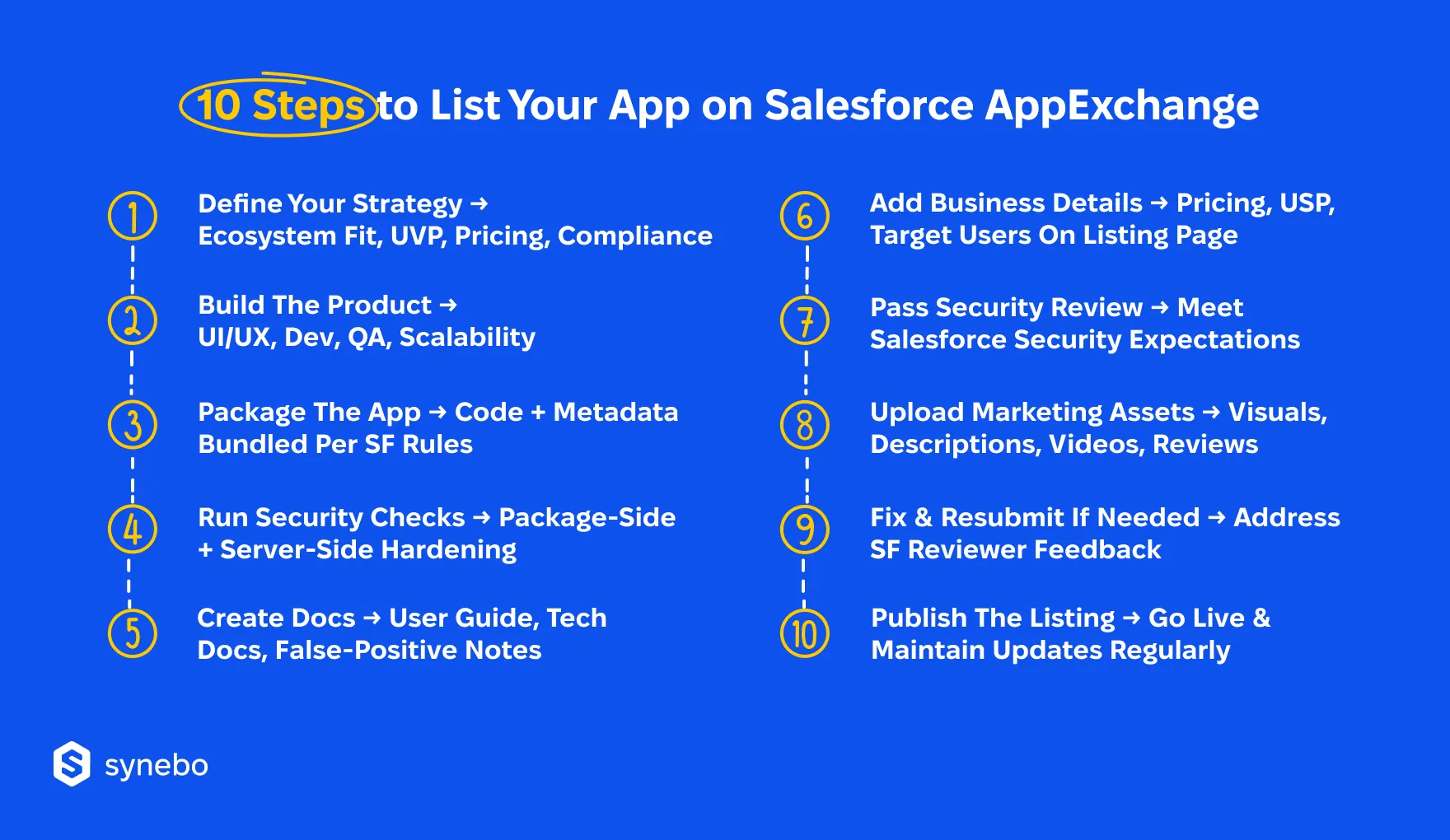
Step 1. Develop Your Business Strategy
For starters, there is a crucial difference between listing a free and a paid app on the Salesforce AppExchange platform.
If you plan a free app, you won’t need to define pricing tiers, payment flows, monetization mechanics. However, a “free” AppExchange listing has a strict meaning. Your product must be genuinely free. And fully functional. It can’t have hidden рауwalls or dependencies on раіd 3rd-party licenses. Note that SF does not allow listings that appear free but require customers to purchase external subscriptions to unlock core functionality.
At the same time, your AppExchange app listing must fully comply with the platform rules and security standards.
Paid apps follow a different path. In this case, your solution must meet all eligibility requirements for commercial offerings, including defined pricing, licensing, and contractual obligations.
Some strategizing aspects for Salesforce AppExchange listing are:
- Understanding the Salesforce ecosystem
- Market research and target audience identification
- Developing a Unique Value Proposition (UVP)
- App design and Salesforce integration
- Pricing strategy
- Quality assurance and security compliance
- Effective marketing and sales strategy
- Customer support and success plans
- Long-term growth and scalability plans
In this official article, SF helps you develop your business model and a market entry plan.
Step 2. Build Ready Software Solution
Develop a software solution that addresses a specific need within the Salesforce ecosystem. Ensure that it is fully functional, user-friendly, and adds value to potential users.
This involves:
- Ideation
- UI/UX designing
- Coding a ready software solution
- Extensive QA testing
In your future Salesforce AppExchange listing, consider aspects like scalability, usability, and integration with Salesforce features. Your solution should also solve a real user problem or enhance existing Salesforce functionalities, setting a solid foundation for a successful AppExchange listing.
Step 3. Package Your Software Solution
Packaging your software solution is basically creating a manageable and deployable package that can be easily installed by Salesforce users.
This step includes bundling all the necessary components, such as code, metadata, and configuration files, into a single package. Ensure that the package is compatible with various SF editions and follows Salesforce packaging guidelines.
Proper packaging is crucial for smooth installation and upgrade processes, and for maintaining the integrity of your AppExchange app listing within the SF environment.
Let’s explore the package options.
Unmanaged Package
This is an open toolkit. You hand over the components, and the recipient has full control over how they’re used and modified.
This type features:
- Components are fully editable by the installer
- No upgrade path; changes must be managed manually
- Ideal for learning, experimenting, or internal distribution
- Easy to inspect, copy, or adapt without restrictions
Unmanaged packages are perfect for sharing templates, samples, or internal prototypes without locking anyone into updates. They can be a starting point when you first list an app on AppExchange – before moving to a controlled release.
Managed Package
This one, on the other hand, is a controlled release, where you maintain ownership and can deliver updates systematically.
In its turn, it features:
- Controlled access to components, often with protected elements
- Supports versioning and automatic upgrades
- Enables license management and usage tracking
- Best suited for commercial apps or public AppExchange listings
A Salesforce managed package published on the AppExchange allows developers to retain control, manage updates efficiently, and protect intellectual property. It is ideal for commercial apps or widely distributed solutions.
Step 4. Run Security Checks on Package & Server Sides
Conduct thorough security checks both on the package side and the server side, especially if your future Salesforce AppExchange listing integrates with external systems.
This covers:
- Scanning for vulnerabilities
- Ensuring data protection
- Adhering to Salesforce’s security best practices
Use tools recommended by Salesforce for security scanning and address any issues found.
For server-side checks, also ensure that the key processes are in place.
Focus on:
- Secure data handling
- Authentication
- Authorization
A robust security posture is essential for passing the Salesforce security review.
Read Also: AppExchange Security Review: How to Pass
Step 5. Write Extensive Documentation for Your Software Solution
To be listed on the AppExchange, you have to provide comprehensive documentation for your software solution.
Make sure to develop and enclose:
- Detailed user guide
- Explanations of any potential false positives in security reports
- Technical design documents
Good documentation enhances user experience, aids in troubleshooting, and is crucial for the security review process. It should clearly explain how to install, configure, and use your app, and also detail any complex technical aspects.
Solutions with complete docs often see higher adoption rates and customer satisfaction.
Here is an example of a well-documented Salesforce AppExchange listing.
Step 6. Apply Business Plan on Your Listing Page
When listing your app on AppExchange, incorporate a clear and well-thought-out business plan on your listing page.
Its essential elements are:
- Pricing strategy
- Target market
- Unique Selling Points (USP)
- Customer support details.
Your business plan should align with the needs and expectations of Salesforce users, demonstrating how your app provides value. A compelling business plan on your Salesforce AppExchange listing page helps attract potential customers and sets clear expectations about your app’s capabilities and benefits.
Step 7. Run Security Review
Undergo the mandatory Salesforce security review process, a rigorous examination of your app’s security posture. This review checks for compliance with SF’s security standards and is crucial for your app’s credibility and trustworthiness.
Prepare by ensuring your app meets all security requirements.
Pay heed to:
- Secure coding practices
- Data protection
- Proper handling of user permissions
Passing this review is a critical step in the Salesforce AppExchange listing process and is necessary for your app to be published on the marketplace.
Step 8. Add Marketing Materials
To get listed on AppExchange, we recommend that you enhance your listing with effective marketing materials.
Complement your app with:
- High-quality images
- Engaging product descriptions
- Demonstration videos
- Customer testimonials
Marketing materials should highlight the features and benefits of your app, making it appealing to potential users. These materials play a significant role in how your app is perceived and can significantly impact its success on the marketplace after AppExchange app publication. Ensure your marketing content is professional, informative, and aligned with your brand messaging.
Step 9. If Your App Is Rejected, Address Concerns & Resubmit
If your app isn’t approved for listing on the first attempt, carefully review Salesforce’s feedback.
To move forward, focus on the following:
- Examine all issues raised, from functionality to security and documentation
- Implement necessary changes to meet SF’s requirements
- Ensure your app uses best practices for publishing an app on AppExchange
- Double-check compliance and overall quality before resubmitting
This step may require a few iterations – yes. Yet, resolving these concerns is essential for a successful Salesforce AppExchange listing.
Step 10. Рublish Your Listing
After your solution passes the security review and meets all Salesforce AppExchange listing requirements, you can publish it. This makes your app available to SF users worldwide.
When you are doing it, make sure your listing page has all the necessary info:
- Detailed descriptions of your app
- Guides for your users
- Pricing
- Support details
After publishing the AppExchange application, we advise refreshing it with new features, updates, and customer feedback – regularly. This maintains relevance and attracts new users.
Strive to make your AppExchange listing a success? Join forces with Synebo, an experienced AppExchange Salesforce partner – and turn your app into a thriving product.
Your Route to Successful AppExchange Listing: Checklist
Getting your app ready to become a Salesforce AppExchange listing is like preparing for a showcase. Our experience proves that here every detail counts, each element tells users why your solution matters.
We’ve prepared this AppExchange app publication checklist that you may use as your guide to cover essential steps and anticipate probable challenges.
▢ Set up your Partner Business Org – Your listing requires it. Ensure your account is well and fully configured.
▢ Choose your packaging model – Decide what fits your strategy: a managed / unmanaged package, or even an OEM approach.
▢ Prepare a clean, structured, stable расkage – Confirm that your namespaces / dependencies / permissions / versioning are consistent.
▢ Run internal security audits during development – Address vulnerabilities before the SF’s team points them to you.
▢ Scan your code with SF Code Analyzer and other trusted tools – Cover static / dynamic checks that strengthen уоur future Salesforce AppExchange listing.
▢ Everywhere review access enforcement – Мake sure Арех classes / flows / UI elements follow the SF CRUD/FLS rules.
▢ Secure your connected apps and OAuth settings – Refine scopes, reduce excessive permissions, validate token flows.
▢ Detail your system architecture — Add notes on data management / access permissions / security scans / installation steps.
▢ Build test orgs – Еnsure уоur both orgs – scratch and packaging – realistically simulate usage by your future target users.
▢ Create an installation guide – Еxplain all steps for setup, specify permission sets, describe optional configs. Do it clearly, exclude ambiguity.
▢ Make a compelling Salesforce AppExchange listing – clearly define your value, back it up with strong visuals, spotlight concrete use cases. Use confident, active language for that.
▢ Plan for the review cycle – Keep resources available so that you can respond to SF’s questions, retest quickly, and/or supply updated scans.
▢ Check your pricing model – Сonfirm that billing, licensing, and your revenue-share structure is ready for the ISV Program.
▢ Gather first testimonials – Securing short comments or pilot feedback from your first adopters. This gives more credibility to your AppExchange app listing.
▢ Prepare materials for your launch – Have emails, slides, partner announcements, and onboarding content ready – for the weeks after approval.
▢ Run a final pre-submission sweep – Сonfirm all doсs, scans, permissions, and package components are complete and up to date.
Boost Your App: Visibility & Adoption After Listing
Listing on Salesforce AppExchange is somewhat similar to publishing on most other platforms. Here are specific and general strategies incorporating which will help your software solution become trending in the Salesforce community:
- Leverage analytics for targeted marketing: Utilize Salesforce’s embedded analytic tools to track metrics such as the number of installations, search terms used to find your app, and the number of product page views. Use Salesforce Reports and Dashboards, Einstein Analytics, App Analytics, Salesforce Event Monitoring, and Marketing Cloud Analytics, Analyzing metrics allows for a more targeted marketing approach, enabling you to understand your audience better and adjust your strategy accordingly.
- Optimize for search within AppExchange: Ensure your app’s listing is optimized for search within the AppExchange. This includes using relevant keywords, creating an engaging app description, and regularly updating your listing with new features or updates to maintain relevancy.
- Use web-to-lead for lead generation: Enable the Web-to-Lead feature to capture leads directly from AppExchange. This means every user who installs your app or views related content can be added to your CRM for future marketing campaigns. This direct lead generation is invaluable for personalized follow-up and conversion.
- Create engaging content and demos: Plan for and develop engaging content such as demo videos, webinars, and detailed user guides. This not only helps in educating potential users about your app’s features and benefits but also boosts engagement and retention on your product page, contributing to higher visibility.
- Engage with the Salesforce community: Actively engage with the Salesforce community through forums, user groups, and social media. Participate in discussions, offer solutions, and showcase how your app addresses specific user needs. Building a reputation within the community can significantly boost word-of-mouth referrals and the overall visibility of your app.
By combining these strategies, you can effectively enhance your app’s visibility and drive its adoption within the Salesforce ecosystem.
Your Listing on Salesforce AppExchange, De-Risked
So, we’d compare getting an app listed on the AppExchange with a controlled ascent. You map the concept, validate security expectations, prepare your solution and documentation. Then move through review gates that reward your discipline and timing. When these pieces fall into place, momentum builds. When they don’t, delays grow costly.
This is why many ISVs don’t want trial runs and choose a steady guide. A seasoned Salesforce AppExchange development company shortens your path considerably. It keeps your spend predictable and protects your release window without draining your team’s focus.
If you want that confidence, Synebo leads ISVs through the AppExchange app development services that cover architecture, security prep, and review readiness.
Hire AppExchange developers from Synebo – get listed on the largest marketplace with fewer surprises and better control over time and budget.
Your app must meet SF’s platform standards, first of all. These are proper packaging, Арех and Lightning compatibility, adherence to CRUD/FLS rules, a strong security posture. Components, integrations, and metadata should be well-structured. If you meet these requirements, it ensures your app functions reliably, satisfies SF criteria, and is quick(er) to pass the mandatory security review.
It greatly depends. It is conditioned by complexity, security readiness, and doc quality. Simple apps can move through review in a few weeks. More complex solutions may take longer (up to several months). If you prepare well, run all internal audits, fix vulnerabilities, you streamline this process. When you plan ahead, you keep your launch closer to the intended market timeline.
Costs depend, too. Your app can be free or commercial. Paid apps require enrollment in the SF Partner Program. The program carries annual fees. Plus, there will be potential development and review-related expenses. As for free apps, they avoid direct fees, but they still need packaging, testing, and documentation (which involve your resources).
Yes, apps that sync with external services can apply. Yet, SF expects secure and transparent connections in them. OAuth flows, АРІ permissions, data handling – these must always follow their strict standards. Be clear and careful when you document integration details, and also thoroughly test your product – it minimizes review delays. When 3rd-party connections are well managed, it enhances your app’s credibility.