AppExchange Security Review: How to Pass
When you get your app listed on AppExchange, it is a signal of trust to thousands of potential customers. The mandatory AppExchange security review ensures that your solution handles data responsibly, follows platform rules, and protects users. If you fail that check, your launch can stall for weeks, and you may need to pay again for a second attempt.
On the flip side, passing the Salesforce security review arms you with serious confidence. Buyers see that you meet the same rigorous security standards as top enterprise vendors. SF approval often translates into your faster entry to market and shorter sales cycles. Plus, when prospects evaluate your offering, they tend to trust you more from the outset.
In this article, we’ll outline the Salesforce security review process, highlight key AppExchange security review tools, and explain how to pass the Salesforce AppExchange security review when you build an app for AppExchange.
What is Salesforce Security Review?
It is a mandatory vetting process that every application must pass before it appears publicly on AppExchange. The process involves manual and automated inspections of your code, config, dependencies.
Read Аlso: What Is Salesforce AppExchange and Why Should You Build on It?
The Security Review goal is to ensure that your app poses no threat to customer data, follows SF’s best-practice security patterns, and avoids common vulnerabilities (such as SOQL/SQL injection, weak authentication, improper field- and object-level controls, or platform-specific security issues).
During the check, the Salesforce Product Security Team runs threat-modelling tests and, if needed, penetration-testing-style checks – akin to a gatekeeper who ensures only robust, safe apps make it to the marketplace.
When passing the Salesforce AppExchange Security Review, it’s also important to know what SF examines beneath the surface:
- Trust-No-One Security Principle. The review now favors a zero-trust mindset: “assume no user or system deserves automatic access”. Expect checks around MFA enforcement, least-privilege user roles, and strict data separation. Solutions that validate identity every step earn smoother approval during evaluation.
- Hidden AI Threats. When you develop an AppExchange app – especially if your product relies on AI/ML, pay attention that SF quietly expanded its checks for AI-related security issues: AI-driven logic, sensitive-data handling, and inference risks (through adversarial triggers or injected toxic data).
Salesforce AppExchange Security Review Fee
Understanding the Salesforce AppExchange security review cost is essential if you are planning to list your app(s). As our clients sometimes say, these can impact their release plan.
So, here’s what you need to know:
- Security Review for paid applications: USD 999 per submission attempt. If your solution is rejected, resubmission costs another USD 999.
- Security Review for free applications: currently no fee (though you still must pass the review to be listed).
Knowing the Salesforce security review fees in advance helps you manage your submission(s) without surprises.
AppExchange Security Review Process: Quick Look
Salesforce structures the review in clear phases. Our experience shows that each phase rewards methodical preparation.
So, how does the Salesforce AppExchange security review work?
Below are the stages your app moves through when you present it for evaluation:
- Preparation. Before anything reaches SF, you have to gather documentation, review code for common security issues, verify permission sets. A clean package at this initial stage cuts back on any rework.
- Submission. In the Salesforce security review submission phase, you provide your app through the Partner Community with all test credentials, security statements, and supporting materials. Missing elements in this stage often slow the process down.
- Initial Review. SF conducts automated scans and manual analysis. They look for weak field access, flawed authentication methods, insecure integrations, questionable third-party libraries, and more – we’ll unpack it in detail later on.
- Feedback. If the Salesforce crew uncovers problems, they issue a report with specific findings. (Please note: the report language is technical, so we advise that you bring engineers into your conversations.)
- Resubmission (if needed). Before another AppExchange security review submission, you have to address all the findings stated in the SF report, revise your documentation, and – surely – provide an updated build.
- Approval. Success in this phase leads to publishing rights on AppExchange.
- Maintenance. Security expectations always evolve – please mind it. So, plan periodic internal audits, dependency upgrades, and permission refinements to avoid surprises during future updates.
How to Pass AppExchange Security Review: Best Practices
Sure, it feels obvious, but this is exactly where we need to start. Passing AppExchange security review with Salesforce comes down to steady preparation.
Then, building an AppExchange app is only part of the job. Solid documentation and straightforward dialogue with reviewers also play an important role. Our experience proves that the whole process rewards those who treat security as part of their product design, not those who treat it as a final cleanup before release.
So, with this in mind, how to prepare for a Salesforce security review in practice?
This is a set of proven, tried-and-tested methods that will help you move with far fewer surprises.
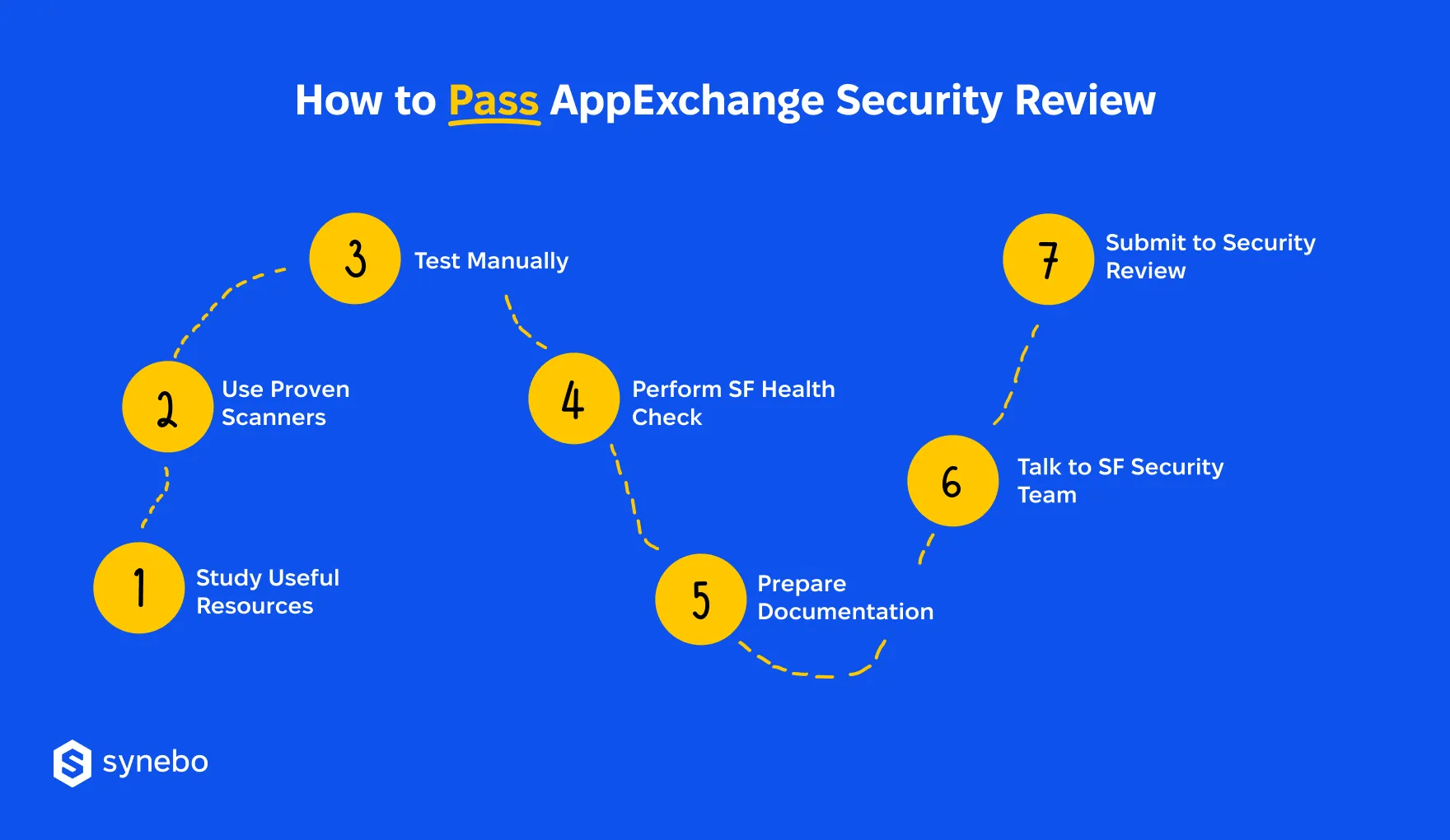
1. Know Rules Before You Build
Before you think about submitting your product, take time to understand the Salesforce’s Security Review requirements. Your app needs to adhere to the platform-level coding and security standards long before it reaches the review queue.
To make sure you are on the right track, use the core bodies of knowledge:
- AppExchange Security Review guidelines
- ISVforce Guide
- Salesforce Security Guide
- Resources for building secure solutions on SF
- Secure Coding Guide
- OWASP materials
The last point above – the OWASP ecosystem overall – is valuable. The OWASP Top 10 points out the most damaging risks in apps, from broken authentication to unsafe serialization. Additionally, this OWASP Testing Guide offers a structure for spotting weaknesses early.
Naturally, when developing AppExchange apps, your app(s) must also account for SF-specific pitfalls – beyond general web threats. These include misconfigured sharing rules, incorrect handling of protected custom settings, and flawed Apex patterns (We’ll cover this in more detail below.)
2. Use Proven Scanners
Now, let’s go to the practical things. To pass AppExchange security review, use automated tools – scanners. They will help you uncover issues early.
Here are what we can recommend:
- Salesforce Code Analyzer – it’s a required tool, as this is the one SF itself relies on internally. It gives you a unified view of Арех, LWC, and dependency risks. Run it locally or plug it into CI/CD – this way every commit will be checked to meet SF’s security expectations.
- Checkmarx, PMD, ESLint – they highlight unsafe patterns, insecure field access, faulty logic in Apex or LWC.
- DAST scanners (OWASP ZAP or Burp Suite) – they explore the running app for weak authentication flows, session handling flaws, or exposure through public endpoints.
When you prepare for an AppExchange security review, we recommend that you use scanners after adding each important feature. Also, combine static scans with runtime analysis to cover both code structure and actual behavior.
3. Test Manually
The Salesforce reviewers evaluate how well you understand platform security guidelines from the ISVforce Guide – we mentioned it in the list of useful knowledge resources.
For your success in the AppExchange security review, make these key checks:
- VaІidate Арех methods for field-level and object-level permissions.
- Inspect UI components and flows for risky patterns (i.e., unguarded navigation, unvalidated data, etc).
- Review external integrations and callback endpoints – make sure nothing leaks beyond intended boundaries.
Manual testing uncovers blind spots that scanners overlook. They help especially well around business logic and complex sharing rules.
4. Perform SF Health Check
Another tool that we recommend using before submitting your app for ISV Security Review is Salesforce Health Check.
It helps as:
- It measures your org’s security settings in accordance with the SF official security guidelines.
- It highlights weaknesses well (such as overly permissive profiles, insecure sharing rules, or risky session settings).
- It offers highly reliable guidance and helps you prioritize fixes that strengthen your org before the review.
So, go through the report for any weak points, then apply recommended adjustments. Don’t forget to repeat the Check periodically – especially after serious updates, to maintain alignment with the ISV Security Review expectations.
5. Set Up Environment & Docs
Good documentation is an integral part of your future success. It reduces questions from the SF security team and so smooths the Salesforce AppExchange security review process.
So, to prepare your environment and docs, focus on these steps:
- Provide a Developer Edition org with clean sample data.
- Share login credentials, user profiles, permission sets – they are needed to explore all functionality.
- Add usage instructions that describe critical features, typical user paths, and configuration requirements.
If your package is tidy, it guides reviewers toward the right scenarios. It also effectively prevents delays due to missing access.
6. Consult with SF Security Specialists
SF offers security meetings through the Partner Security Portal. We recommend that you don’t skip them – such live sessions are really useful. They help bring clarity to issues you feel doubtful about before your full AppExchange security review submission.
How to make the most of these sessions?
- Ask specific questions for advice. If you make broad requests, you’ll get “broad” answers.
- Request confirmation on tricky implementation areas, such as token handling or CSP enforcement.
- Take notes and update your internal docs so your engineers know what to adjust.
This proactive step reduces misunderstandings and improves confidence while preparing materials for the AppExchange security review.
7. Submit Your Package for Review
When everything is ready, transfer your Salesforce managed package for security review through the Publishing Console in the Partner Community.
Include these supporting materials:
- Security statement that describes which scanners you used and how issues were resolved
- Usage instructions – concise and well-structured
- Short explanations for any known false positives, if applicable
Before sending, we advise that you run a final accuracy check. Version numbers, dependencies, credentials, access configs must all be correct. The SF crew should have effortless access to every org, component, and feature they will evaluate.
Common Security Risks
Now, let’s turn our attention to another crucial topic – the most common risks when passing the Salesforce AppExchange security review.
Actually, SF consistently flags the same types of issues. If you, as an ISV, address them in advance, it protects your release timeline.
Here’s what SF most often calls out during an AppExchange security review:
- SOQL / SQL injection, record-sharing violations, weak authentication protocols – require immediate fixes. Guard queries, check sharing models, enforce strong identity flows.
- LWC / JavaScript concerns – revolve around CSP, inline scripts, and outdated libraries. Remove unsafe legacy code, rely on Locker Service rules, define explicit CSP headers.
- False positives appear in scan reports even when code behaves correctly. Provide short explanations, note mitigation steps, and attach links to relevant platform docs so reviewers understand your decisions.
Treat every flagged item early and seriously. It speeds up your Salesforce AppExchange security review and also raises your product’s security level.
Protect your launch timeline and minimize probable resubmission costs. Reach Synebo – a proven AppExchange Salesforce partner. Our specialists will prepare your package and guide you through the review.
What Salesforce Expects: Core Security Duties for ISVs
How to keep SF’s trust when you build an app for Salesforce AppExchange? The path is straightforward: you show that your product carries the same discipline and restraint SF expects inside its platform.
We know that Salesforce’s Security Review requirements spark anxiety for many ISVs. Yet, they follow a clear logic: protect data, limit exposure, demonstrate that your engineering choices respect the SF principles throughout the product lifecycle.
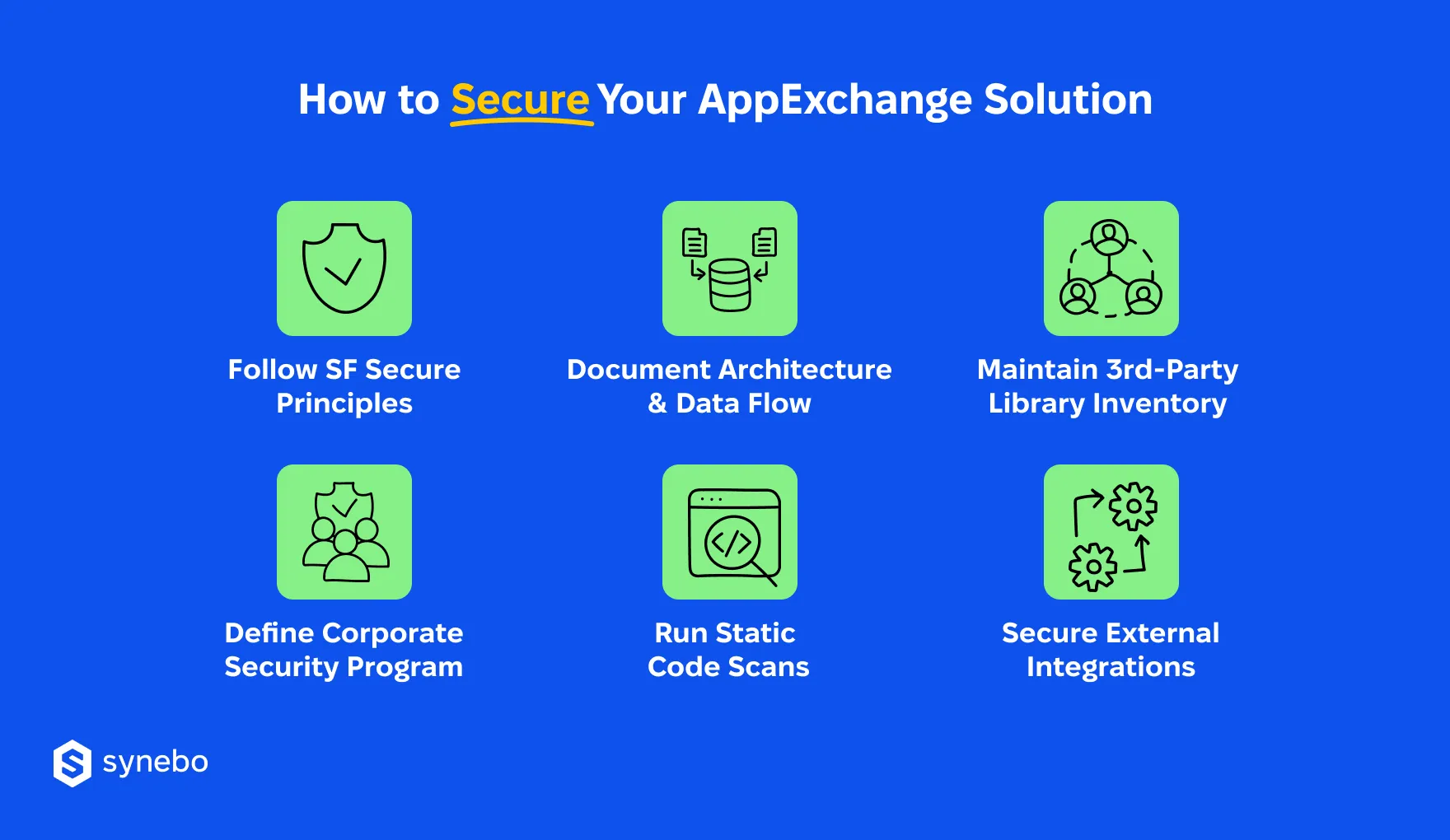
So, what exactly does Salesforce expect before it gives your app the green light?
- You follow SF’s secure-by-design principles. SF checks if your solution adheres to them. So, during the AppExchange security review, their crew watches your enforcement of sharing rules, access controls, safe data handling, plus the absence of hard-coded secrets. Any shortcut here quickly attracts their attention.
- You provide a clear data-flow overview. Your SF reviewers expect diagrams, integration overviews, session flows, and evidence of how sensitive info travels. Crisp documentation functions as a proof of control and a map of your decision-making. We can prove that weak descriptions usually raise their concerns.
- You track 3rd-party libraries. SF reviews 3rd-party libraries with the same scrutiny they apply to your code. So, you have to maintain a complete inventory, track versions, and stick to approved packages. If you use outdated components, they can (and most probably will) request resubmission.
- You document your corporate security program. Whether you maintain your own team or rely on AppExchange app development services, show how you govern SDLC processes, vulnerability discovery, incident response, vendor assessments. SF reviewers want proof that security sits inside your routine.
- You submit the required static code scans. SF expects you to send them results from mandatory static analysis – Salesforce Code Analyzer, first of all. Submit your results, address anything actionable, and explain legitimate false positives clearly. A vague explanation rarely satisfies the panel.
- You secure external integrations. If your integration architecture is loose, the review slows down fast. So, truly important is strong authentication, protected endpoints, encrypted transit, clear data-storage notes.
A polished approach to these expectations turns the Salesforce managed package security review process from a source of stress into a predictable checkpoint. When these fundamentals stay in order, launch delays shrink, rework costs drop or fade, and your path to the marketplace stays steady.
Field-Tested Ways to Speed Up Passing AppExchange Security Review
Now that you know the approval flow, the required tooling, and what Salesforce expects, the next question you may have is “Can І speed up the review?” You can. The most effective tactics stem directly from everything we’ve covered above.
Let’s bring them together here.
Let Security Shape Your Design Choices
Product decisions influence code quality later. When you develop an app for Salesforce AppExchange, start with permission planning, data boundaries, user context enforcement, safe integration ideas at the design stage. Problems usually appear when ISVs glue controls at the end of a build.
- Define the CRUD/FLS approach before writing Apex
- Choose reliable authentication methods early
- Decide on storage rules for sensitive fields upfront
Run Regular Internal Security Audits
Run regular checks. Internal scans and peer reviews give you a chance to catch obvious trouble – when it’s not too late.
- Schedule weekly static code scans
- Inspect SOQL queries for sharing gaps
- Review log output and API calls
Document Everything Methodically
SF reviewers move faster when they see clear material. So, when building and launching your AppExchange app, present your architecture, data flow explanations, 3rd-party library notes, external endpoint descriptions in a consistent format.
Keep everything in one controlled repository.
Swiftly Address Any False Alerts
Static scanners always report noise. Remove it early. The longer a flagged issue stays open, the greater the chance it slows down your submission.
Mark each case and prepare a simple explanation with evidence.
Plan Buffer Тime for Review Іterations
AppExchange Security Review rarely ends after one round. So, we recommend that you add reserve time – for follow-up questions and updates.
Patience here protects your release dates.
Track Salesforce Security Updates
Salesforce’s Security Review requirements evolve. So, follow SF documentation, trusted blogs, and recent review experiences shared by other ISVs.
Stay informed, and you’ll avoid surprises when your app reaches the SF auditors.
Need an expert hand navigating these tactics? Synebo, as a trusted AppExchange partner, can help your app pass the review faster. Reach out and make your launch smoother.
What to Do If Your App Failed to Pass Security Review?
A failed AppExchange Security Review feels frustrating. But the situation always gives direction. SF usually provides detailed findings, and your focused approach can easily turn those notes into a roadmap.
The aim here: shorten the delay, reduce repeat submission costs, and protect your launch plans.
These are the steps you can take:
- Do manual testing. Automated scanners uncover patterns, but a security engineer uncovers behavior. Get a tester who will dig into session handling, access control, data exposure, and endpoint configs. Their report brings grounded fixes.
- Review internally and update your package. Meet with your engineering, product, and architecture crews. Еxamine each finding. Remove weak code, improve authentication logic, adjust CRUD/FLS usage, update libraries (pay particular attention to unsafe ones).
- Engage a Salesforce AppExchange partner. An experienced PDO understands current SF expectations, typical pitfalls, and recent review outcomes. Their involvement speeds up your preparation. They may also support documentation, run static scans, and offer guidance during resubmission.
Failure doesn’t define your product. It just pushes you to strengthen your security posture for re-entry into the Security Review queue.
How Synebo Can Help You Pass AppExchange Security Review
Many of our clients admit that passing the Salesforce AppExchange Security Review demands structure, patience, and steady guidance.
Synebo, а trusted Salesforce AppExchange development company, supports ISVs with 10 years of hands-on experience in building and listing various SF products. To speed up approval of the app, protect release timing, and reduce waste on repeat fixes, we assist with security design reviews, health checks, scan preparation, documentation development, and (re)submission strategy.
Our team holds a 100% AppExchange approval rate, which means every package we prepare reaches the finish line, and a 4.9 rating based on verified customer reviews – a proof that our approach works well for all submissions.
You work with a team that knows what SF reviewers look for – not from theory, but from repeated, real submissions. As a Crest Consulting Partner, ISV Partner, and PDO, Synebo can help you anticipate reviewer questions, avoid rejection triggers, and align your package with the current AppExchange standards. You get a smooth path to your app approval.
Before You Submit Your Package
Your successful AppExchange security review doesn’t hinge on luck. SF rewards those ISVs who maintain discipline at every stage of development – clean code, consistent documentation, and a security posture that mirrors Salesforce standards.
When this foundation stays firm, approval arrives soon.
If you need extra hands (and heads) or want to hire AppExchange app developers who understand the review inside out, Synebo supports ISVs with field-tested guidance, secure architecture, and preparation that keeps the review predictable.
Contact us – and let our engineers guide your next AppExchange submission.
It’s a mandatory audit for any product listed on AppExchange. SF reviewers inspect code quality, data handling, authentication flows, and integration behavior to protect customers and the platform’s stability. Passing this audit confirms your solution follows SF security expectations and reduces risk for clients adopting your application.
Timelines vary. They greatly depend on complexity, queue volume, and resubmission needs. A first review often requires several weeks. Follow-up questions extend the whole Salesforce security review process. We usually advise planning extra time – it helps keep launch dates intact, because delays can often come from missing docs and/or unresolved false positives rather than major flaws.
SF usually provides their findings with clear notes. Your team should then update code, documentation, config, static scan results. After that, you submit your product again. Many ISVs hire AppExchange developers to shorten remediation work and avoid multiple cycles, because resubmission fees and extra time affect launch plans.
Frequent reasons are weak CRUD/FLS enforcement, unsafe endpoints, outdated external libraries, improper data storage, missing input validation. Gaps in docs also slow the SF reviewers. If you treat security late, it produces these failures. Addressing it during the design phase protects your schedules and reduces expensive fix rounds before approval.