Is Traditional Salesforce Changing? Dreamforce 2026 Key Innovations
Yes, Salesforce Dreamforce 2026 showed that traditional Salesforce is changing. The way people interact with the platform may no longer be limited to SF itself. AIforce (recently renamed SIforce), Claudeforce, Slackforce, and Agentforce bring SF data, workflows, and actions into Claude, Slack, and other interfaces.
SF says its employees already gained 8.1 million annualized productivity hours through Slackbot, showing how work can move beyond the traditional CRM interface.
These all make the Dreamforce 2026 innovations more significant than another list of product launches.
So, does your current SF architecture still make sense when you may work with the platform through AI, agents, Slack, Claude – without opening your SF windows? Let’s explore it together.
What Is Actually Changing in Salesforce?
For users, Salesforce may become… less visible. While it is deeply embedded in your data and workflows. Dreamforce 2026 innovations show the important shift is happening behind the interface: SF records, business logic, permissions, workflows can now support actions initiated through AI assistants, Slack, agents, and other applications.
So, now the platform does not necessarily have to be the place where work happens to remain the system powering it.
This does not make your existing SF architecture irrelevant. Quite the opposite: your data, permissions, processes, business logic you have built over the years become more important – new interfaces can now use them. This is one of the biggest Dreamforce 2026 key takeaways for companies that run their operations in SF.
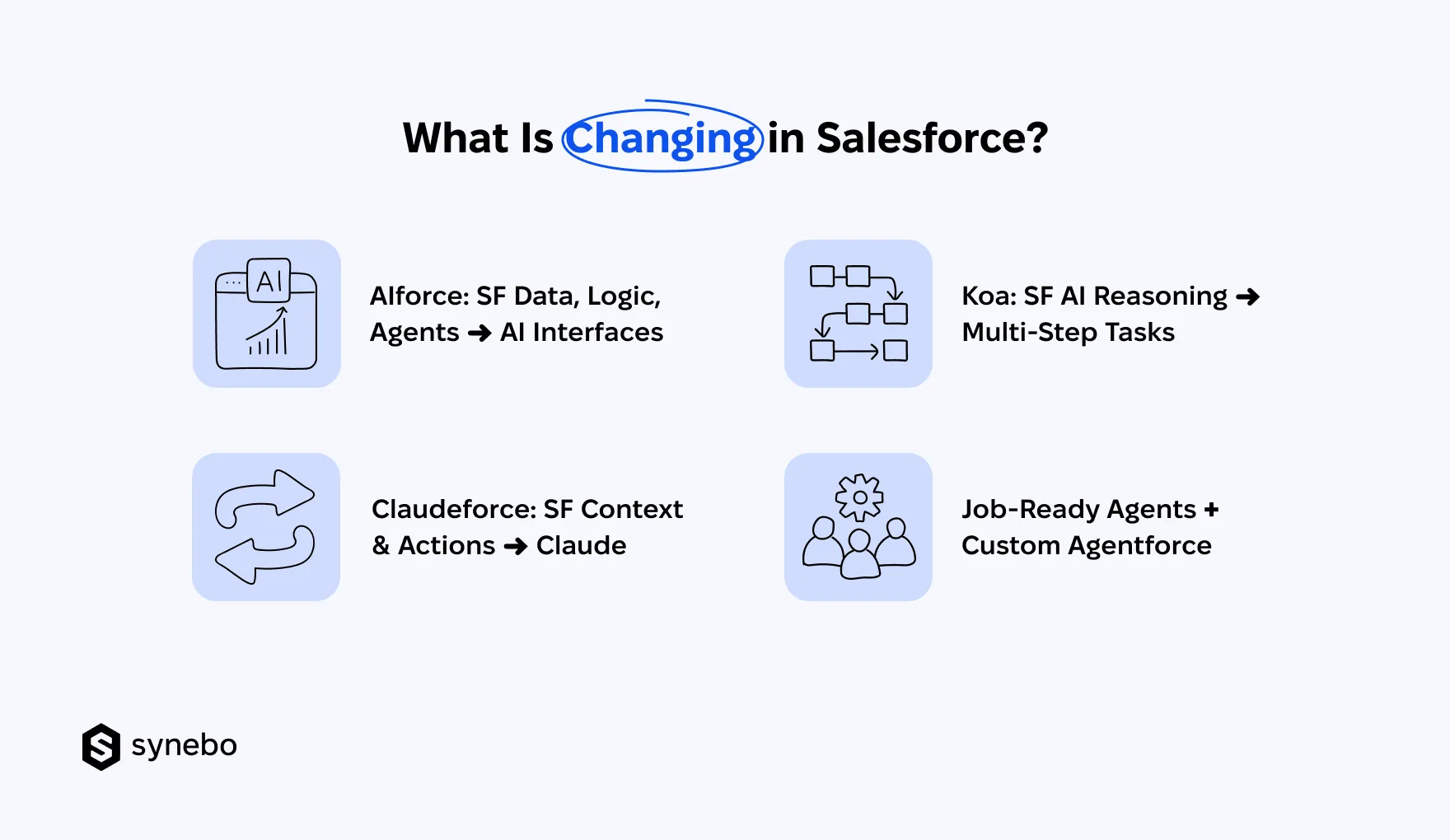
The shift becomes easier to understand through the key Salesforce Dreamforce announcements and innovations behind it:
- AIforce (SIforce)
- Claudeforce
- Koa
- Job-Ready Agentforce Agents + Custom Agentforce
What is Salesforce AIforce (SIforce)?
Salesforce announced that AIforce (SIforce) makes SF available through more interfaces. It turns the platform into an environment that can power AI interfaces wherever your people work. This is just it what brings SF data, workflows, business logic, permissions, security, governance into AI interfaces. And users can interact with SF capabilities through natural language.
What the launch of AIforce Salesforce means in practice:
- Salesforce Becomes Underlying Environment. The key change is in the architecture: existing objects, fields, relationships, rules, processes can support new interfaces. You don’t need to rebuild your SF foundation every time your employees get a new way to interact with it.
- Employees Can Work Through AI Interfaces. Your employee may ask for account information or request an action through an AI interface instead of opening several SF pages. The interface changes, but SF remains the source of the business context and controls.
- Existing Investments Gain New Entry Points. You can get more use from the SF capabilities you already pay for – by bringing them into tasks that happen outside the traditional SF workflow.
What is Salesforce Claudeforce?
Thanks to the Salesforce and Anthropic partnership, your team can now work with SF information and processes directly in Claude. You can use prebuilt sales skills and work with customer data, trigger SF actions, follow existing business rules without switching to Claude and back to SF for every step.
Here is what Cloudforce puts into focus:
- Claude Can Use SF Data You Already Work With. Instead of copying SF details into Claude, your – for example – Sales team can ask questions about your customers, deals, sales activity, and get answers grounded in your SF data. Claude can also use this context to carry out supported Salesforce actions.
- Permissions Still Matter. Moving the interface does not remove enterprise controls. You still need to define who can access your SF data, which actions Claude can take, how existing security and governance rules apply.
- SF Analytics Is Coming to Claude, Too. SF plans to bring Tableau analytics into Salesforce in Claude, alongside additional skills for service, marketing, commerce, and industry use cases. If you are already using SF and Tableau, this can make your existing SF data and analytics available through the same AI interface.
- Your SF Architecture Now Powers More Interfaces. SF used to sit behind the tools your Depts worked in. With Claudeforce, Claude itself can become a way to reach SF data and actions. (This poses a practical question: which SF processes should be available through AI, and what controls should sit around them?)
What Is Salesforce Koa?
The result of the Salesforce and NVIDIA partnership, Koa is Salesforce’s first reasoning model. It’s designed for complex, multi-step enterprise work inside Agentforce. SF says Koa was post-trained on enterprise knowledge drawn from nearly three decades of platform deployments.
Here’s what Koa Salesforce adds to the picture:
- CRM Reasoning Becomes Dedicated Capability. Koa is engineered for tasks such as working through SF processes, selecting tools, handling multiple steps that require SF-specific context.
- Model Choice Gets More Specific. With Salesforce Koa, model selection starts with the task itself: what the agent needs to do, what Salesforce context it needs, and which data and actions it can access.
- Model Becomes Part of Salesforce AI Stack. With Koa, Salesforce is adding its own reasoning layer for enterprise AI. SF architects now have to consider the model alongside data, agents, integrations, and security when they design Salesforce AI.
What Are Job-Ready Agentforce Agents?
These are Salesforce Agentforce AI agents designed for specific work in sales, service, commerce, employee experience, the back office. These agents come with skills, actions, and data models for a defined job. They give you a starting point that differs from building a custom Agentforce solution around your own process and business logic.
What does this change if you are building with Agentforce?
- Prebuilt Agent Starts with Known Job. You can start with an agent designed for a specific role or process. Then configure it to your way of working.
- Custom Agentforce Puts Your Business Logic at the Center. Custom Salesforce Agentforce agents let you build around your company-specific rules, data, integrations, and business logic.
- AI Strategy Needs Both Paths. You need to decide which jobs fit a prebuilt agent and which require a custom design.
I’d say that the common thread in these Dreamforce 2026 innovations is simple: the platform can become the environment that supplies data, processes, rules, agents to the interfaces your employees already use.
If you’ve been investing in SF for years, it shifts the strategic question to “How should our existing SF foundation support the new ways our people and AI will use it?”
Need help assessing what these Salesforce Dreamforce conference 2026 announcements mean for your existing setup? Talk to Synebo about your architecture, AI plans, and next moves.
What Do These Innovations Mean for Companies That Already Have Salesforce?
AIforce (SIforce), Claude, Slack, and new Agentforce options give you new ways to use your existing Salesforce. After all the SF announcements at the Dreamforce conference 2026, the down-to-earth question is where they fit in your SF setup.
If You Already Use Salesforce
- Review What Your Current Agentforce Does. Start with the business task. If your current Salesforce Agentforce AI agents handle a clear process, assess what they do today, where people still step in, and if the new job-ready Agentforce agents cover a larger part of this work.
- Look Beyond Salesforce Interface. Identify SF capabilities that can also be accessed through Claude, Slack, another AI interface. Then assess where this can simplify how your people work with SF.
- Check if Your Existing Setup Can Support Agent Work. Review integrations, permissions, workflows, data access, approval rules before you add new agents.
- Keep What Still Works. Change What Doesn’t. Years of SF configuration do not suddenly lose their value because the interface changes. Keep the data, processes, integrations, controls that still support your business. Revisit the parts that make new AI-driven ways of working difficult.
If You’re Planning Your First AI Project
- Start With Prebuilt Agent if Job Is Defined. Choose a job-ready Agentforce agent when your use case fits an established sales, service, commerce, or back-office workflow.
- Build Around Unique Requirements. Use Salesforce Agentforce AI agents when your process needs specific data, rules, integrations. Or actions.
If Your Company Already Uses Claude or Another AI Tool
- Keep Salesforce as Business Source. Keep data, business context, permissions, core processes in Salesforce, so AI tools can work with the same info and rules your business already relies on.
- Bring Salesforce Context іnto Existing AI Tools. Let your people access relevant SF data and processes through Claude, Slack, or another interface they already use. So they can work with the SF info from the tools they already know.
- Tie Existing Systems Instead of Creating Parallel CRM. Connect these AI interfaces to your SF workflows and controls. So you extend how your employees use SF instead of building a second place for CRM work.
So, the choice is no longer necessarily “Salesforce or Claude.” The latest news from Salesforce Dreamforce 2026 points toward a setup where SF remains the system of record. And AI becomes the interface through which your people interact with that info and those processes.
As my colleague, Anatoliy Voronov, CTO at Synebo, says about Salesforce’s future direction: “In practice, it means that you build on your existing setup, connect it to the AI tools your team is already using, and add new agents where they can take on defined work.”
What Should Leaders Rethink Before Investing in Next AI Layer?
Before adding another capability, leaders should ask a simple question: what exactly is this new layer supposed to change? The Dreamforce 2026 innovations are a useful prompt to review your current setup before you invest in further Salesforce AI.
Executive Checklist
☐ Where Should This Work Happen? Decide which environment best supports your task: Salesforce, Slack, Claude, another tool. (This decision should follow your business process.)
☐ What Are We Already Paying to Run? Identify valuable SF workflows, automations, business rules. Decide which ones the new AI capability should preserve, extend, or retire.
☐ Can Our Data Support This Decision? Assess if the info behind this process is accurate, accessible, complete for Salesforce AI agents to use it.
☐ What Actions Are We Willing to Delegate? Set limits for approvals, permissions, accountability before agents can act.
☐ Where Do We Need Standardization? Separate repeatable processes from areas that require custom logic.
☐ What Business Change/Result Justifies This Investment? Define the task, owner, baseline, expected result before you select the technology.
From Synebo’s experience, the key is to treat Salesforce Dreamforce updates as inputs for re-assessing your architecture and priorities. Not a reason to add another layer automatically.
What Does Future of Salesforce Mean for Your Existing Investment?
The future of AI in Salesforce is not about replacing the platform you’ve relied on for years. The Dreamforce 2026 innovations show an evolution in how people access SF, use its data, bring AI into their daily work.
For CIOs, CTOs, business crews, and all involved the main question is what these changes mean for existing processes, integrations, data, governance. The latest Salesforce AI updates, Salesforce and Claude developments, and new interfaces give you more options. They also make architecture decisions more important.
Synebo can help you assess your SF environment, map the impact of new AI capabilities, and plan your next step. Talk to Synebo experts about your Salesforce strategy.